Effective Date: 12th Feb 2026. This new ESP Block Policy will be implemented on 12th Feb 2026. Current users will receive advance notification and have time to review their email practices before enforcement begins.
What you should do now: review your current bounce classification data, implement recommended email authentication and best practices, clean your email lists and improve content quality, and monitor your ESP block rates closely.
Your sub-account has been temporarily restricted from sending emails due to ESP (Email Service Provider) blocks. This is part of our Anti-Spam Policy designed to protect your sender reputation and ensure high deliverability rates.
What Are ESP Blocks?
ESP blocks occur when major email providers (Gmail, Yahoo, Outlook, etc.) reject your emails due to:
- Authentication failures (DMARC, SPF, DKIM issues)
- Poor sender reputation
- Content that appears spam-like
- Policy violations
- Technical configuration problems
Unlike regular bounces, ESP blocks are calculated separately and trigger immediate restrictions to protect your long-term email deliverability.
New ESP Block System
The block system escalates through three temporary blocks, with warning emails sent before each one. Here is the full progression:
| ESP Block Rate | Action | Duration | Block Level |
|---|---|---|---|
| 3% | Warning Email Sent | Immediate notification | Pre-Block Warning |
| 5% | Email sending suspended | 12 hours | 1st Block |
| 3% (after 1st block) | Critical Warning Email Sent | Immediate notification | Pre-2nd Block Warning |
| 5% (after 1st block) | Email sending suspended | 24 hours | 2nd Block |
| 3% (after 2nd block) | Final Warning Email Sent | Immediate notification | Pre-3rd Block Final Warning |
| 5% (after 2nd block) | PERMANENT SUSPENSION | Permanent | 3rd Block — FINAL |
All blocks are reset after 7 consecutive days of maintaining ESP block rates below 1%.
In this release, email sending will not be permanently disabled. Each block will be temporary and limited to a 24-hour duration only.
If your email service is blocked due to ESP Block Detected, you will see the following error message displayed as a top banner inside the affected subaccount:
Email sending is blocked due to a high number of spam blocks from email providers.
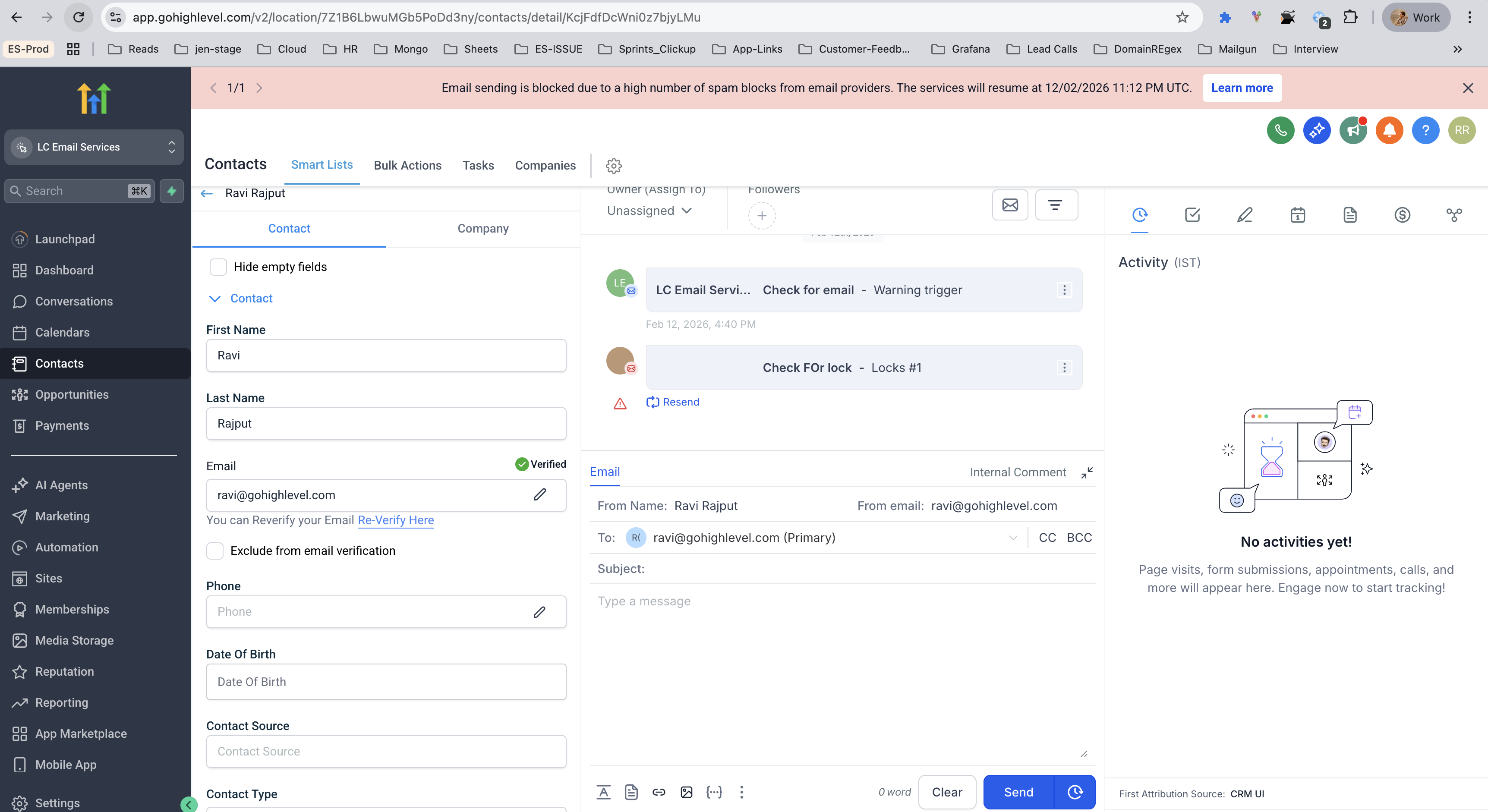
This block is enforced to protect email deliverability and prevent further reputation damage with Email Service Providers (ESPs).
Refer to ESP Block Detected — Immediate Action Required to Restore Email Sending for the recovery walkthrough.
Immediate Steps Required
- Log into your sub-account.
- Navigate to Sub-account Settings → Email Services → Bounce Classification.
- Review your ESP block categories and error details.
- Identify the highest volume ESP blocks affecting your sub-account.
The Bounce Classification feature will show you:
- Specific ESP block categories (DMARC failures, reputation issues, etc.)
- Error volumes by provider (Gmail, Yahoo, Outlook)
- Detailed error messages with exact reasons for blocks
- Recommended actions for each block type
Based on your bounce classification results, you'll need to address:
- Email authentication setup (SPF, DKIM, DMARC)
- Content and template improvements
- List hygiene and engagement issues
- Technical configuration problems
Prepare for the New Policy
Check Bounce Classification Dashboard
- Navigate to Sub-account Settings → Email Services → Bounce Classification
- Identify current ESP block rates and categories
- Review recent email campaign performance
- Document problem areas that need attention
Analyze Historical Data
- Review bounce rates over the past 30 days
- Identify patterns in ESP blocks
- Check which email providers are blocking you most
Email Authentication Setup
- Configure SPF records to include the platform's sending IPs
- Set up DKIM signing for your domain
- Implement DMARC policy (start with p=none for monitoring)
- Verify all DNS records are properly configured
List Hygiene and Quality
- Remove all bounced and invalid email addresses
- Implement double opt-in for new subscribers
- Segment lists based on engagement levels
- Remove inactive subscribers (6+ months no engagement)
Content Optimization
- Avoid spam trigger words and excessive promotional language
- Maintain proper text-to-image ratio (60:40)
- Include clear unsubscribe links
- Use professional, branded email templates
- Test content with spam checking tools
Pre-Implementation Testing
- Send test emails to major providers (Gmail, Yahoo, Outlook)
- Monitor delivery rates and engagement metrics
- Use email testing tools to check spam scores
- Verify email authentication is working correctly
Ongoing Monitoring
- Check bounce classification dashboard daily
- Monitor ESP block rates closely
- Track engagement metrics (opens, clicks, unsubscribes)
- Set up alerts for unusual bounce patterns
Why This Matters
- ESP blocks damage your sender reputation permanently
- Poor reputation leads to emails landing in spam folders
- Reduced deliverability impacts your business revenue
- Recovery can take weeks or months without proper action
- Major ESPs are increasingly strict about email quality
- Authentication requirements are now mandatory
- Content filtering has become more sophisticated
- Sender reputation affects all future campaigns
Next Steps
Use the Bounce Classification feature to understand your specific ESP blocks.
Address the identified issues using our detailed support articles.
Track your improvements through the bounce classification dashboard.
Ensure fixes are working before resuming normal sending.
Support Resources
- Access detailed ESP block analysis
- View error categories and volumes
- Get specific recommendations for your sub-account
- Monitor improvement progress
Category-Specific Support Articles. Each ESP block category in your bounce classification links to detailed fix guides:
Time-Sensitive Actions
- Complete email authentication setup
- Clean all email lists thoroughly
- Optimize email content and templates
- Test email delivery across major providers
- Monitor bounce classification dashboard daily
- Review bounce classification data immediately
- Identify top 3 ESP block categories
- Begin implementing critical fixes (authentication, major content issues)
- Complete all technical fixes
- Clean email lists and remove problematic content
- Test email delivery to major providers
- Monitor bounce classification dashboard daily
- Maintain email best practices
- Regular list hygiene and engagement monitoring
Need Help?
- Use the Bounce Classification feature for detailed analysis
- Follow category-specific support articles for step-by-step fixes
- Access our email best practices documentation
If you need assistance interpreting your bounce classification data or implementing fixes, contact our support team with:
- Your sub-account details
- Screenshots from the Bounce Classification feature
- Specific error messages you're seeing
Important Reminders
- ESP blocks are separate from regular bounces — they require immediate attention.
- Each provider has different requirements — use bounce classification to see provider-specific issues.
- Prevention is better than cure — implement proper email practices from the start.
- Time is critical — delays in fixing issues can lead to permanent restrictions.
- You have 30 days to prepare — use this time wisely to optimize your email practices.
Your email deliverability and business success depend on taking action now. Start with the Bounce Classification feature and begin preparing for the new policy implementation.
Frequently Asked Questions
This policy is designed to protect your sender reputation and ensure long-term email deliverability success. We're here to help you prepare and succeed with these new requirements.
Was this article helpful?
That’s Great!
Thank you for your feedback
Sorry! We couldn't be helpful
Thank you for your feedback
Feedback sent
We appreciate your effort and will try to fix the article