Opportunity Score helps you review your Meta campaign setup in HighLevel Ad Manager before publishing. It checks key setup areas, highlights recommended improvements, and helps you prioritize updates that may improve campaign readiness.
Use Opportunity Score as a pre-launch review tool to catch setup gaps before sending your campaign for publishing. Opportunity Score is available for Meta, Google and LinkedIn campaigns on the Review screen before publishing.
TABLE OF CONTENTS
- What is Opportunity Score?
- Key Benefits of Opportunity Score
- Opportunity Score Panel
- Opportunity Score Recommendation Categories
- What to Fix First
- How To Review and Improve Opportunity Score
- Frequently Asked Questions
What is Opportunity Score?
Opportunity Score is a campaign-readiness tool in HighLevel Ad Manager that helps you review important parts of your campaign before launch. It gives you a percentage score, a band label, and specific recommendations so you can identify setup areas that may need attention before publishing.
Opportunity Score reviews campaign setup areas such as audience, budget, creative, and tracking when applicable. A higher score generally means fewer visible setup gaps were detected, while a lower score means there are recommended areas to review before publishing. Opportunity Score does not automatically edit, publish, or guarantee results for your campaign.
Key Benefits of Opportunity Score
Opportunity Score gives advertisers a faster way to review campaign setup quality before launch. Instead of manually checking every campaign field again, you can use the score panel to understand which areas may need attention and which fixes may matter most.
- Pre-launch review: Review your campaign setup before publishing from the Review screen.
- Clear readiness score: View a percentage score and band label, such as Low, Medium, or High.
- Actionable recommendations: See suggested improvements for campaign setup areas such as audience, budget, creative, and tracking.
- Prioritized fixes: Use the “What to fix first” list to focus on recommendations that may have the highest impact on campaign readiness.
- Faster navigation: Click recommendations or Fix links to return to the related section of the campaign builder.
- Better setup confidence: Reduce missed setup issues before launching your campaign.
Opportunity Score Panel
The Opportunity Score panel gives you a detailed view of your campaign readiness before publishing. Use this panel to review the overall score, category-level feedback, and recommended updates from one place.
The panel may include:
- Overall Opportunity Score percentage
- Band label, such as Low, Medium, or High
- Category cards for setup areas such as Audience, Budget, Creative, and Tracking
- Category-level scores or statuses
- Recommendation text explaining what may need attention
- Impact labels such as Low impact, Medium impact, or High impact
- Links that guide you back to the relevant campaign setup area
- A “What to fix first” list with prioritized recommendations
Opportunity Score Recommendation Categories
Opportunity Score groups recommendations by campaign setup area so you can quickly understand what needs review. Each category helps connect the recommendation to the part of the campaign builder where updates may be needed.
Audience
Audience recommendations help you review whether your targeting may be too broad, too narrow, or missing important targeting details. Audience setup can include locations, demographics, interests, custom audiences, lookalike audiences, exclusions, and retargeting options, depending on the campaign configuration.
Common audience recommendations may include:
- Refining broad targeting
- Reviewing location targeting
- Adding or adjusting interests
- Checking exclusions
- Reviewing retargeting or lookalike audience settings
- Confirming the audience matches the campaign goal
For deeper audience setup guidance, review the HighLevel article on audience controls in Ad Manager.
Budget
Budget recommendations help you identify whether your selected budget may limit campaign delivery or optimization. A budget that is too low for the selected audience or campaign setup may be flagged before launch.
Common budget recommendations may include:
- Increasing a daily or lifetime budget
- Reviewing whether the budget matches the audience size
- Confirming the campaign has enough budget to support meaningful delivery
- Checking budget settings before publishing
For more detail on where campaign budgets are configured, review the HighLevel article on campaign budget definition.
Creative
Creative recommendations help you review the ad content and assets before publishing. This may include ad copy, media, headline, description, call-to-action, destination links, and other details needed for a complete ad.
Common creative recommendations may include:
- Reviewing long or incomplete ad copy
- Adding or updating media
- Checking destination links
- Confirming the call-to-action matches the campaign goal
- Previewing the ad before launch
For additional creative review options, use Advanced Preview to see how a Meta ad may appear across placements.
Tracking
Tracking recommendations help you review conversion-related setup when it applies to the campaign. This can help ensure the campaign has the necessary tracking or conversion configuration before publishing.
Common tracking recommendations may include:
- Reviewing conversion setup
- Confirming destination or event tracking details
- Checking tracking-related warnings before publishing
What to Fix First
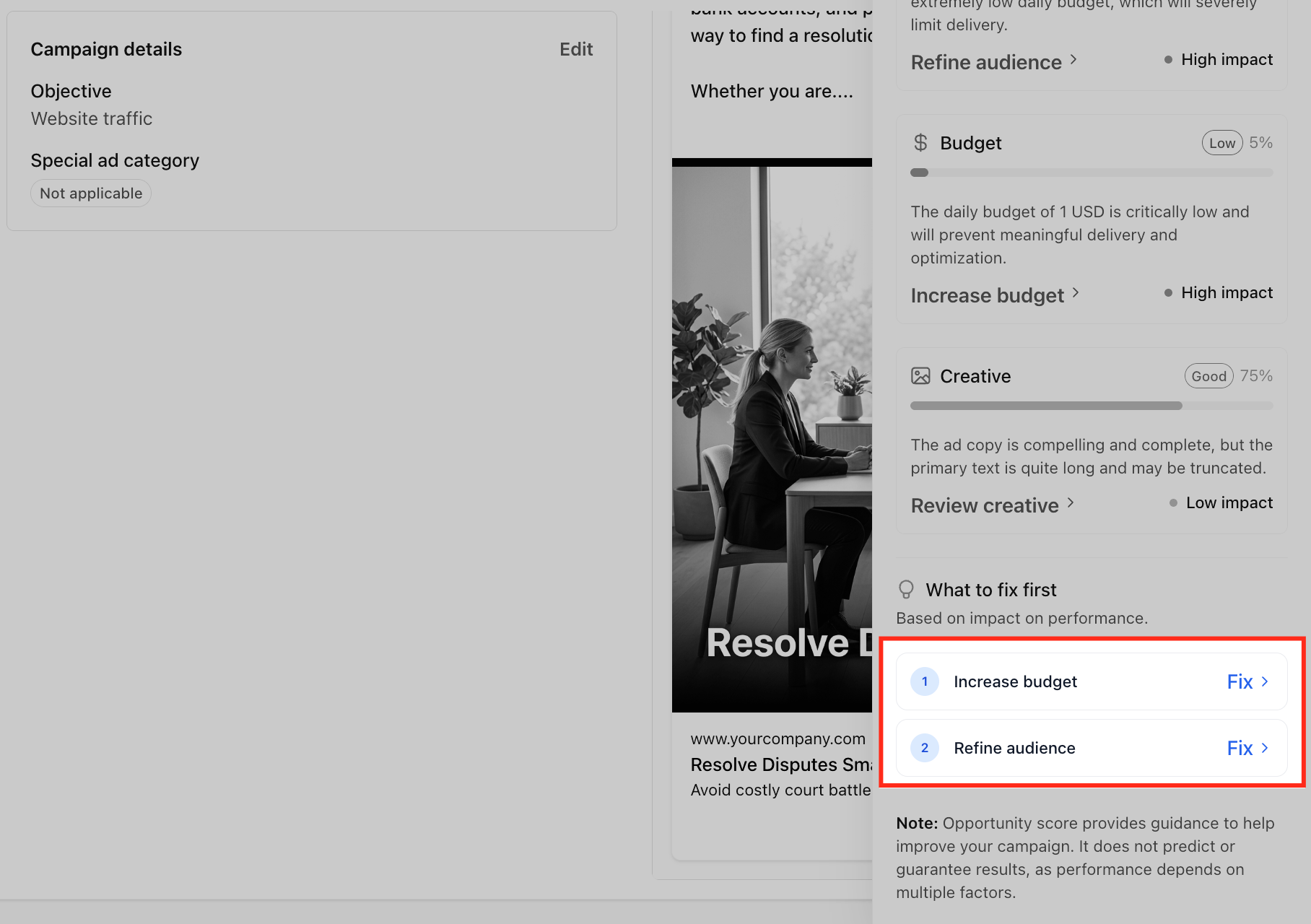
The “What to fix first” area helps you prioritize recommended updates instead of reviewing every setup field manually. Recommendations are ordered based on their likely impact on campaign readiness, allowing you to focus on the most important items first.
Use this area as a pre-publishing checklist. Each item includes a Fix link that takes you back to the related section of the campaign builder so you can make updates more quickly.
Example prioritized fixes may include:
- Increase budget
- Refine audience
- Review creative
- Check tracking setup
How To Review and Improve Opportunity Score
Reviewing Opportunity Score before publishing helps you catch setup gaps while the campaign is still in draft or review stage. After making updates, return to the Review screen to confirm whether the score and recommendations changed.
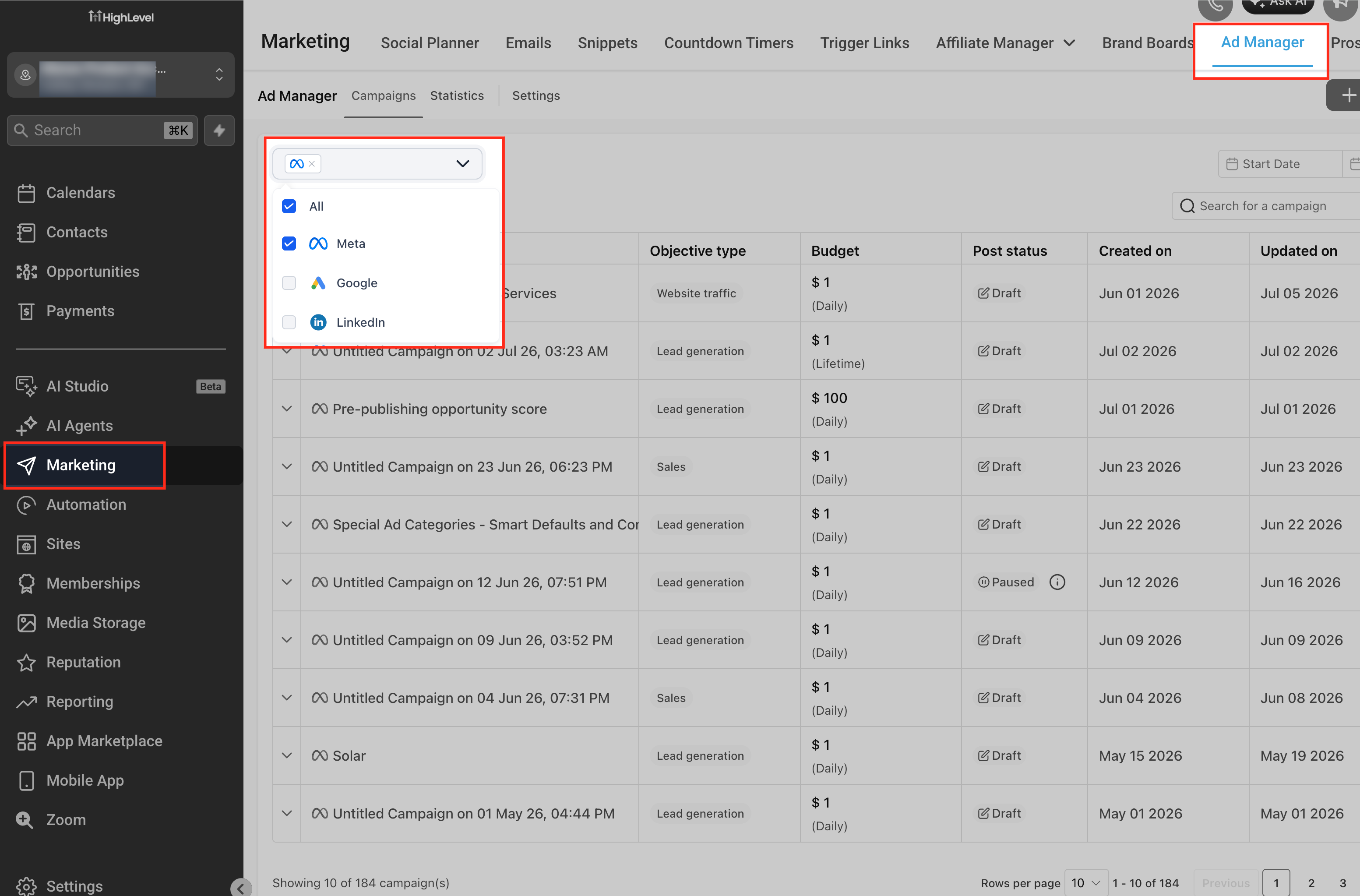
Go to Marketing > Ad Manager
Open Marketing, then select Ad Manager. This is where you can create, edit, review, and publish ad campaigns in HighLevel.
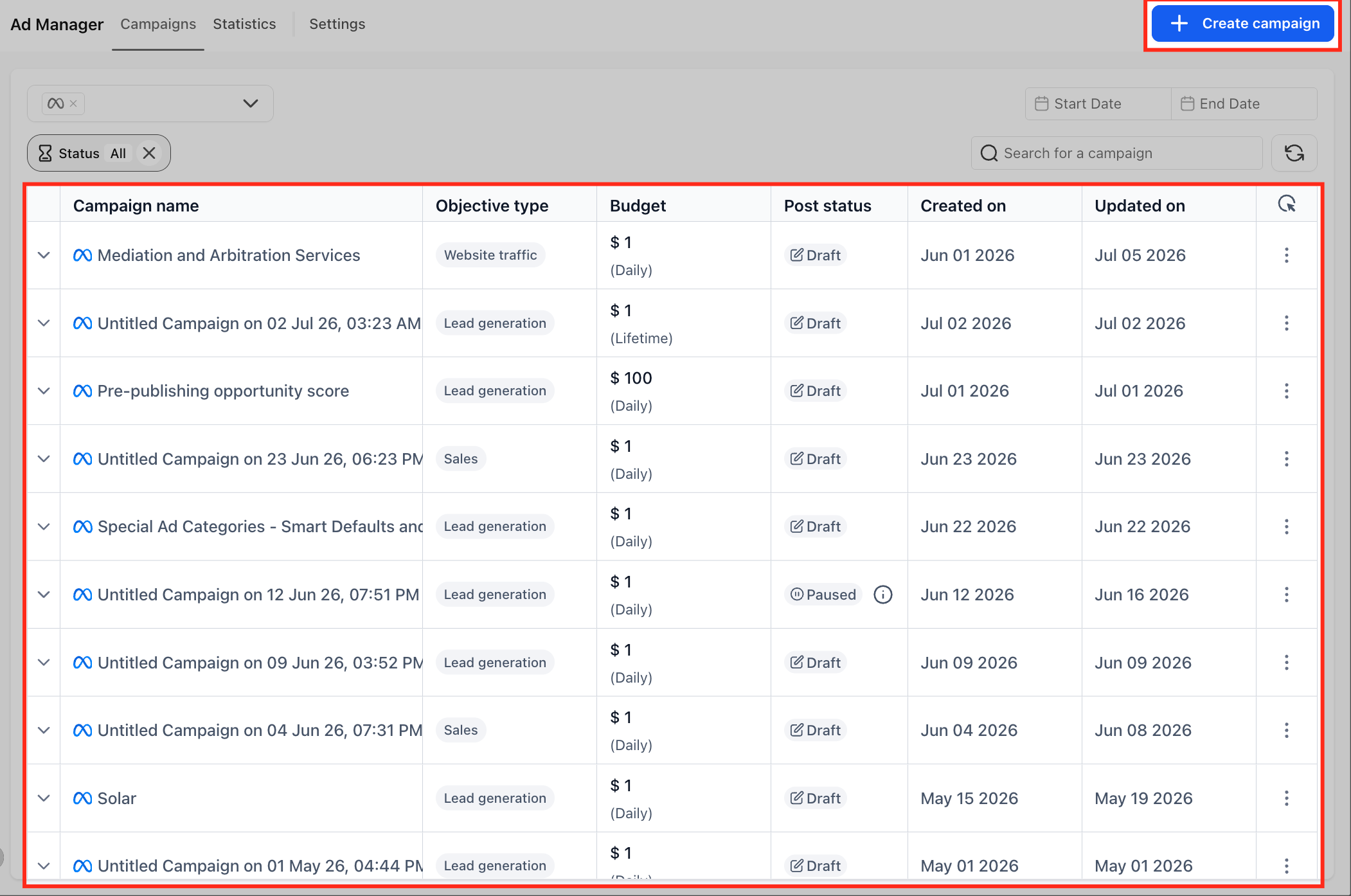
Create a new campaign or open an existing draft
Start a new Meta, Google or LinkedIn campaign or open a campaign draft that has not been published yet. Opportunity Score is available for Meta, Google and LinkedIn campaigns on the Review screen before publishing.
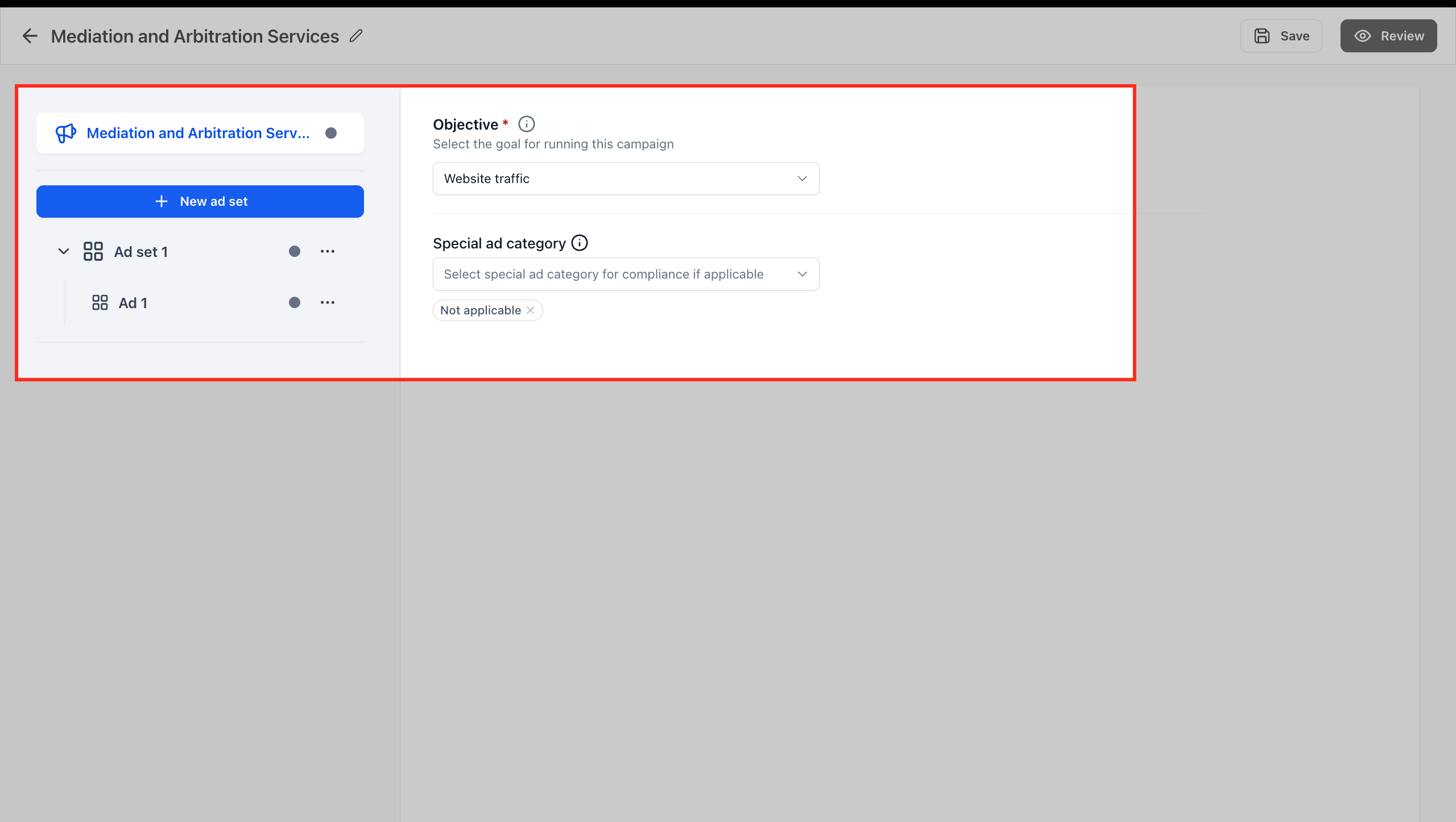
Complete the campaign setup steps
Fill out the required campaign details before reviewing the score. This may include campaign details, ad set details, audience, budget, creative, destination, and tracking-related fields when applicable.
Completing the setup first helps Opportunity Score provide more useful recommendations because it can review the key campaign areas before publishing.
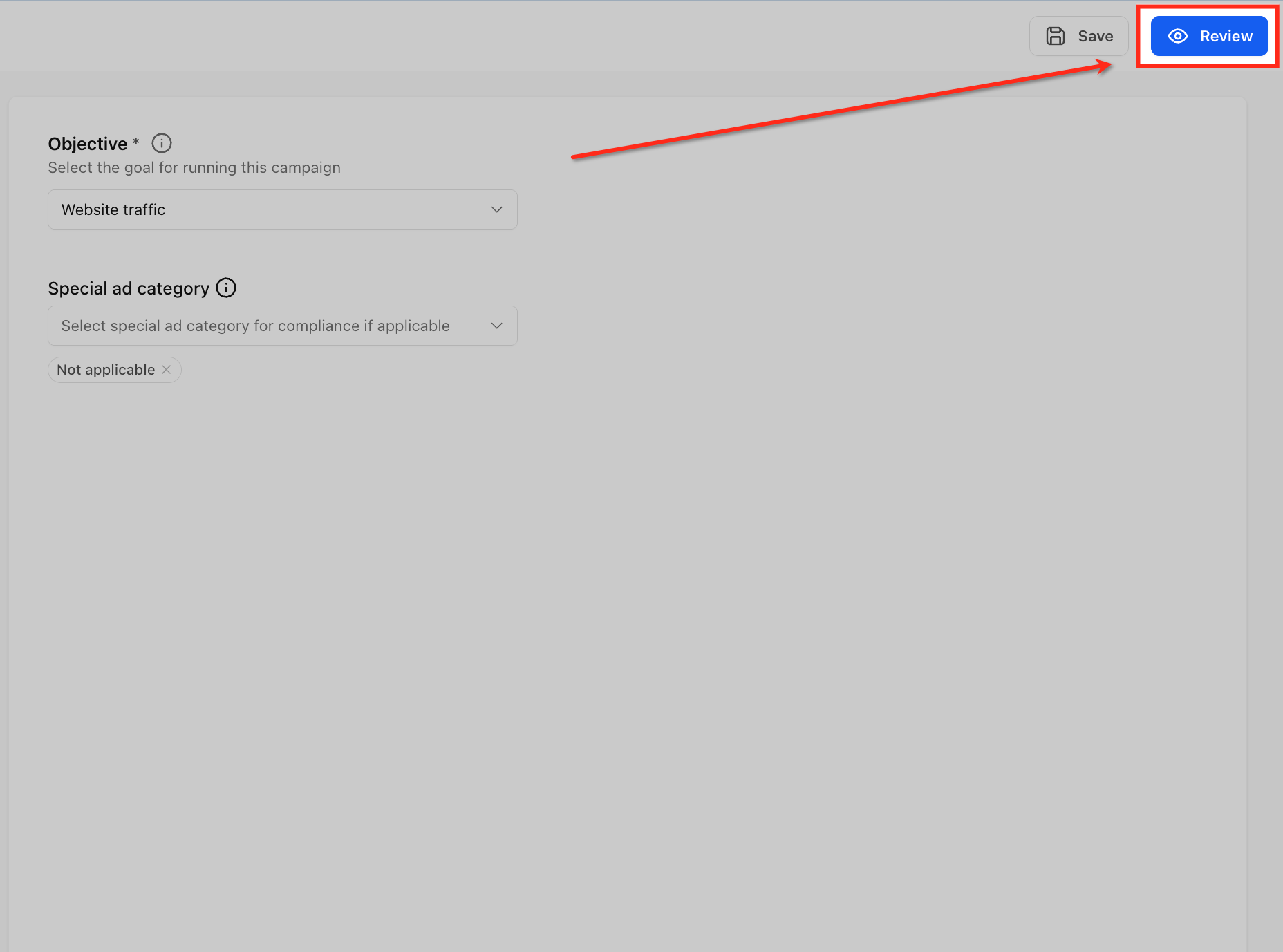
Go to the Review screen
Open the Review screen after completing the campaign setup. Opportunity Score appears before publishing so you can check campaign readiness while the campaign is still editable.
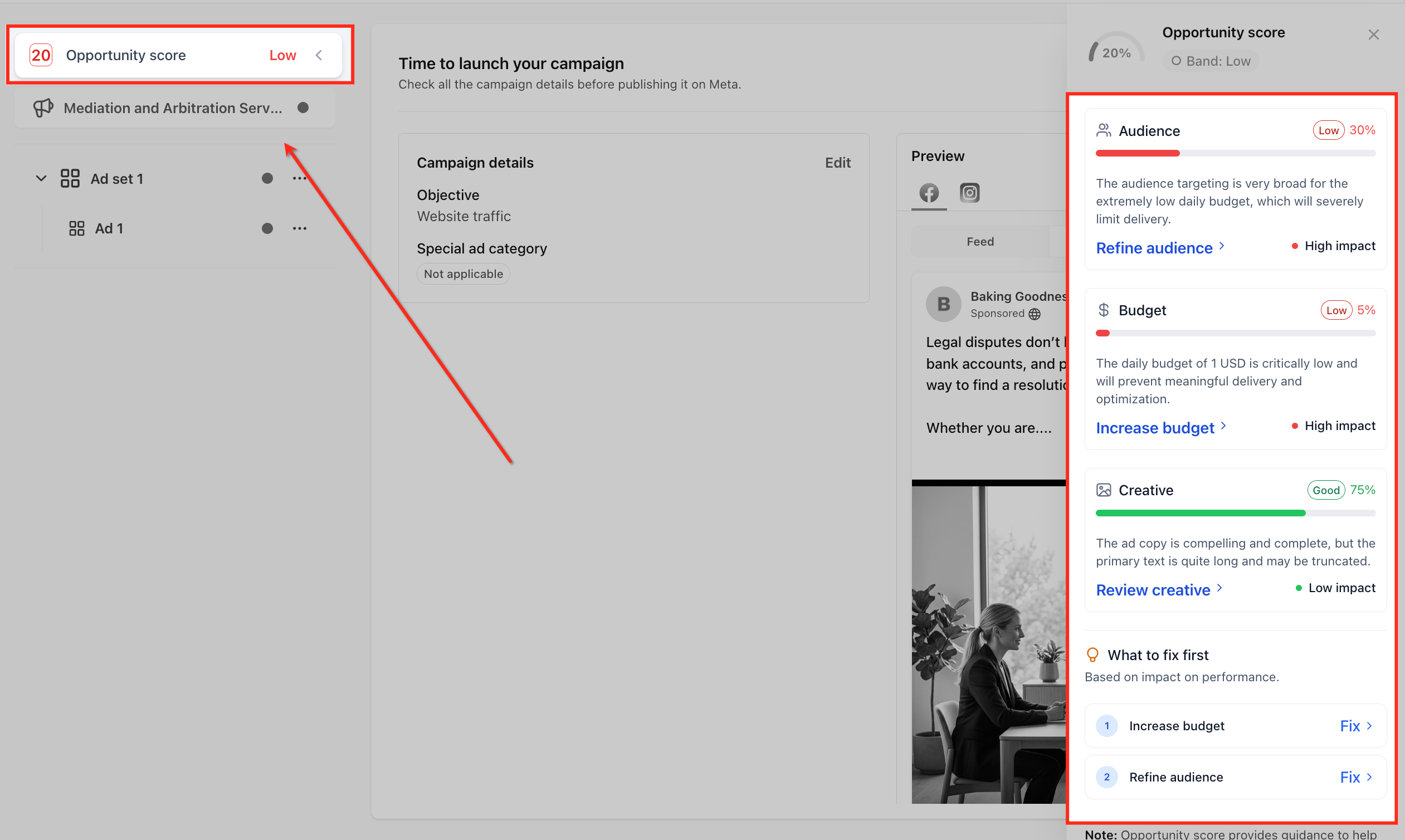
Open the Opportunity Score panel
Click the Opportunity Score area to open the score panel. The panel gives you a closer look at the overall score, score band, category feedback, and recommended improvements.
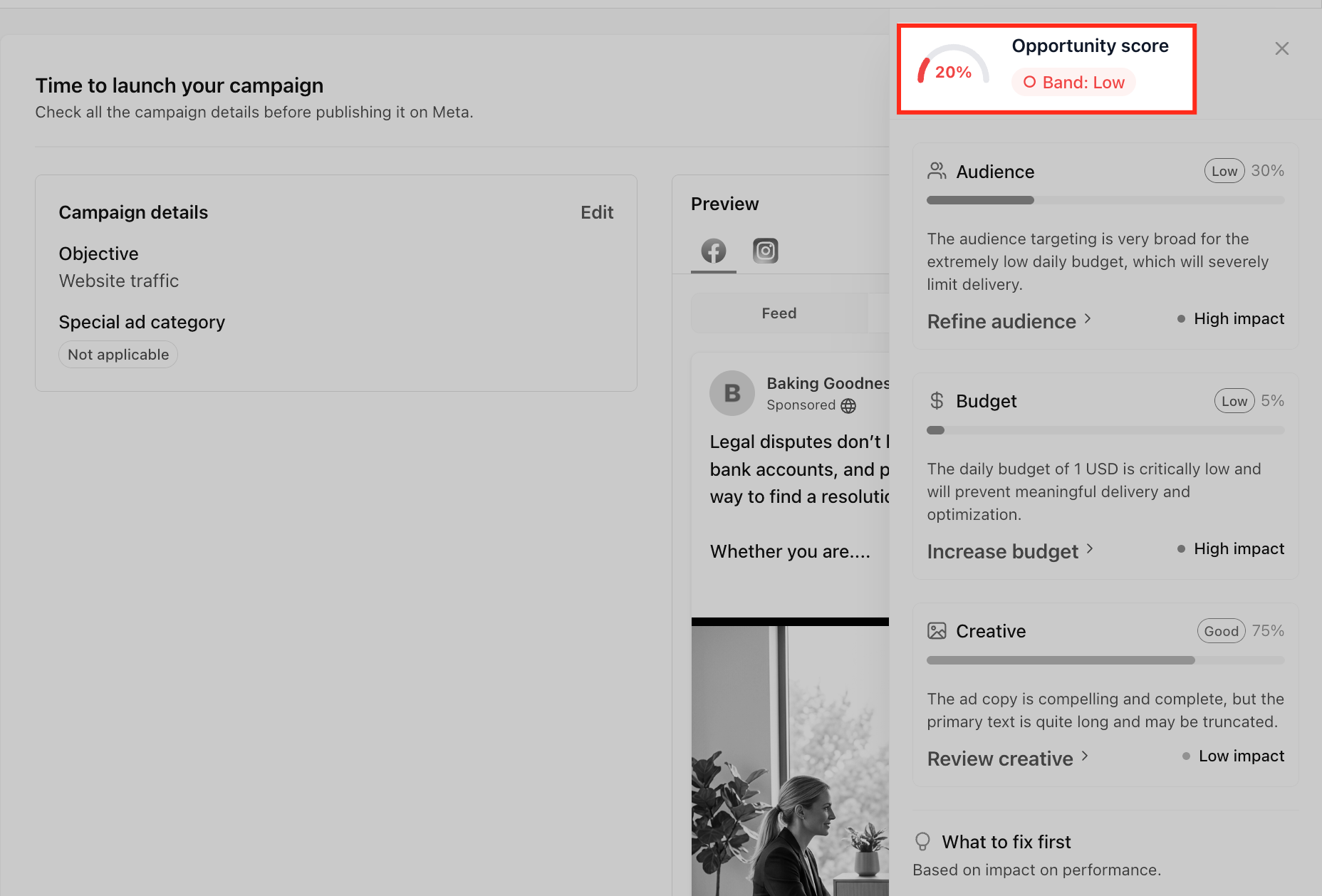
Review the overall score and band label
Check the percentage score and band label, such as Low, Medium, or High. The score gives you a quick snapshot of campaign readiness based on the setup areas reviewed by Opportunity Score.
A lower score does not prevent publishing, but it means there may be setup recommendations worth reviewing before launch.
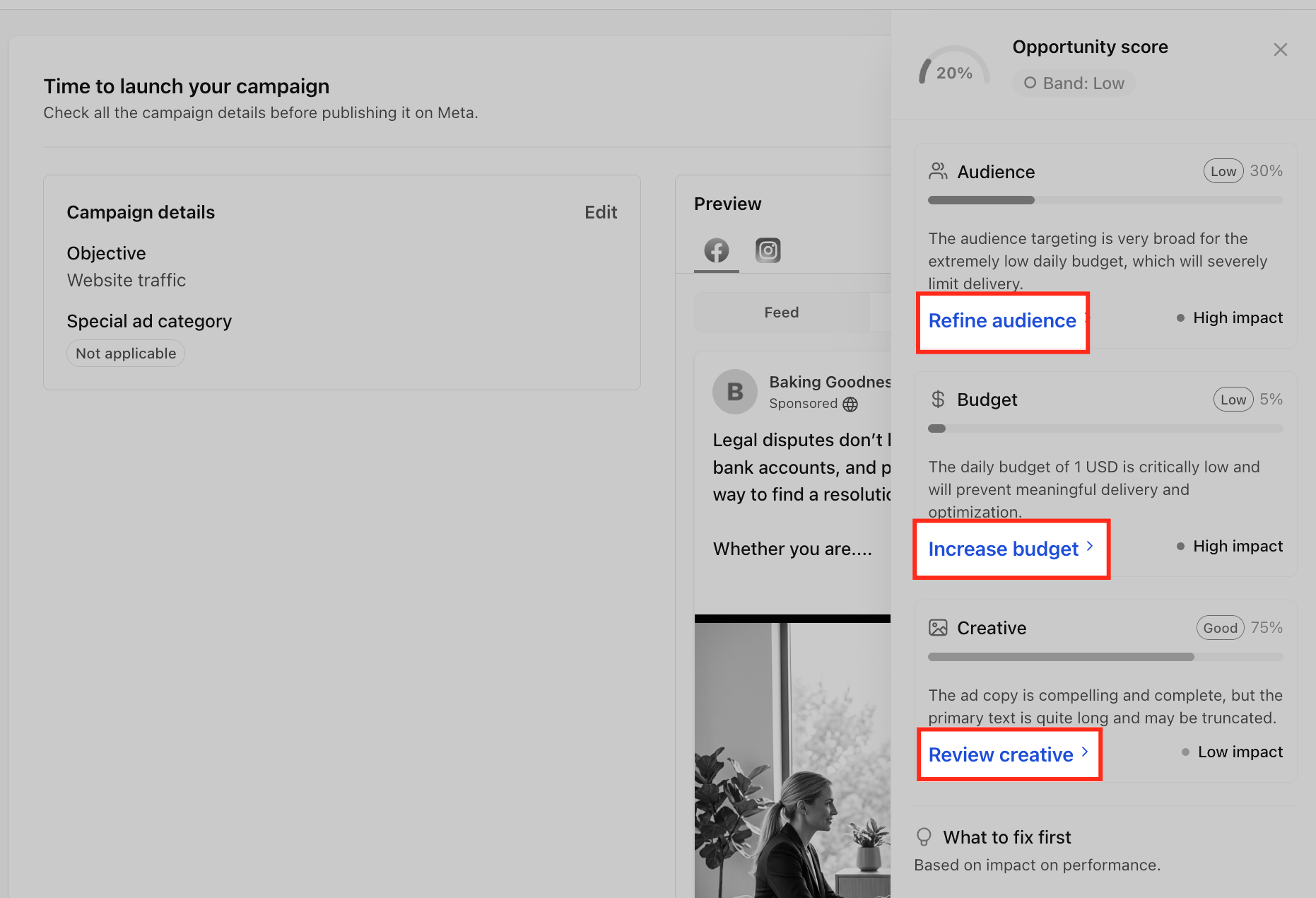
Review recommendation categories
Look through the category cards in the panel. Opportunity Score is shown for different areas such as Audience, Budget, Creative, and Tracking etc.
These categories help you understand which part of the campaign may need attention, instead of making you search through every setup field manually.
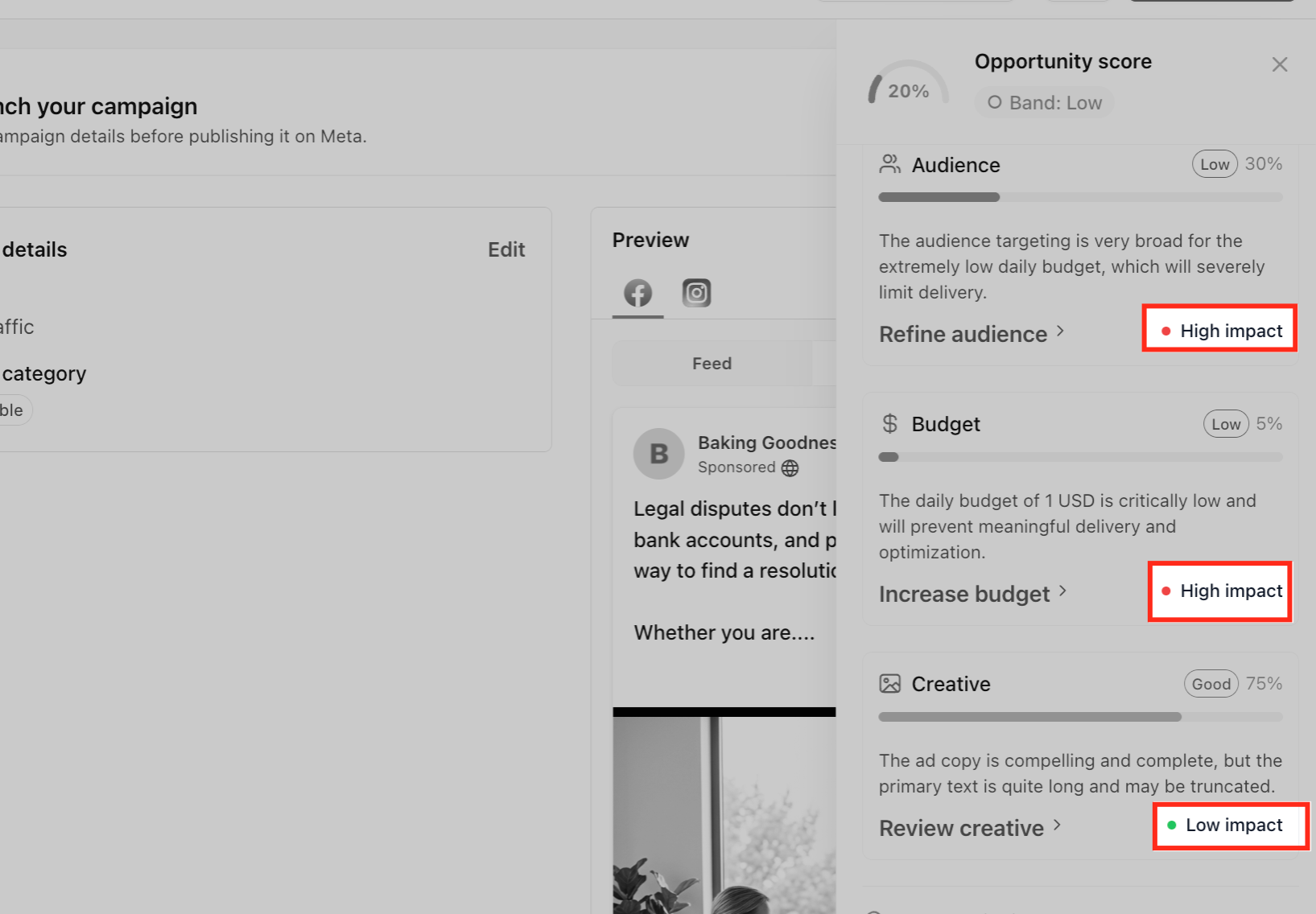
Check impact labels
Review the impact labels attached to recommendations, such as Low impact, Medium impact, or High impact. Impact labels help you decide which updates may matter most for campaign readiness.
Prioritize higher-impact items first when you are short on time or reviewing multiple recommendations.
Review the What to fix first list
Use the What to fix first list as a prioritized checklist. This area highlights recommended updates that may have the highest impact on campaign readiness.
Common items may include increasing budget, refining audience targeting, reviewing creative, or checking tracking setup.
Click a recommendation or Fix link
Click a recommendation or Fix link to return to the related section of the campaign builder. This helps you move directly from the recommendation to the setup area that may need attention.
Make the suggested update
Review the related setup area and decide whether to apply the recommendation. Recommendations are guidance, not automatic changes, so use your campaign goal and business context before editing audience, budget, creative, or tracking settings.
Return to the Review screen
After making updates, return to the Review screen. Opportunity Score may update based on the changes made to the campaign setup.
Review the updated Opportunity Score
Check the score, band label, category feedback, and recommendations again. Continue making updates if needed, or move forward if the campaign setup looks ready.
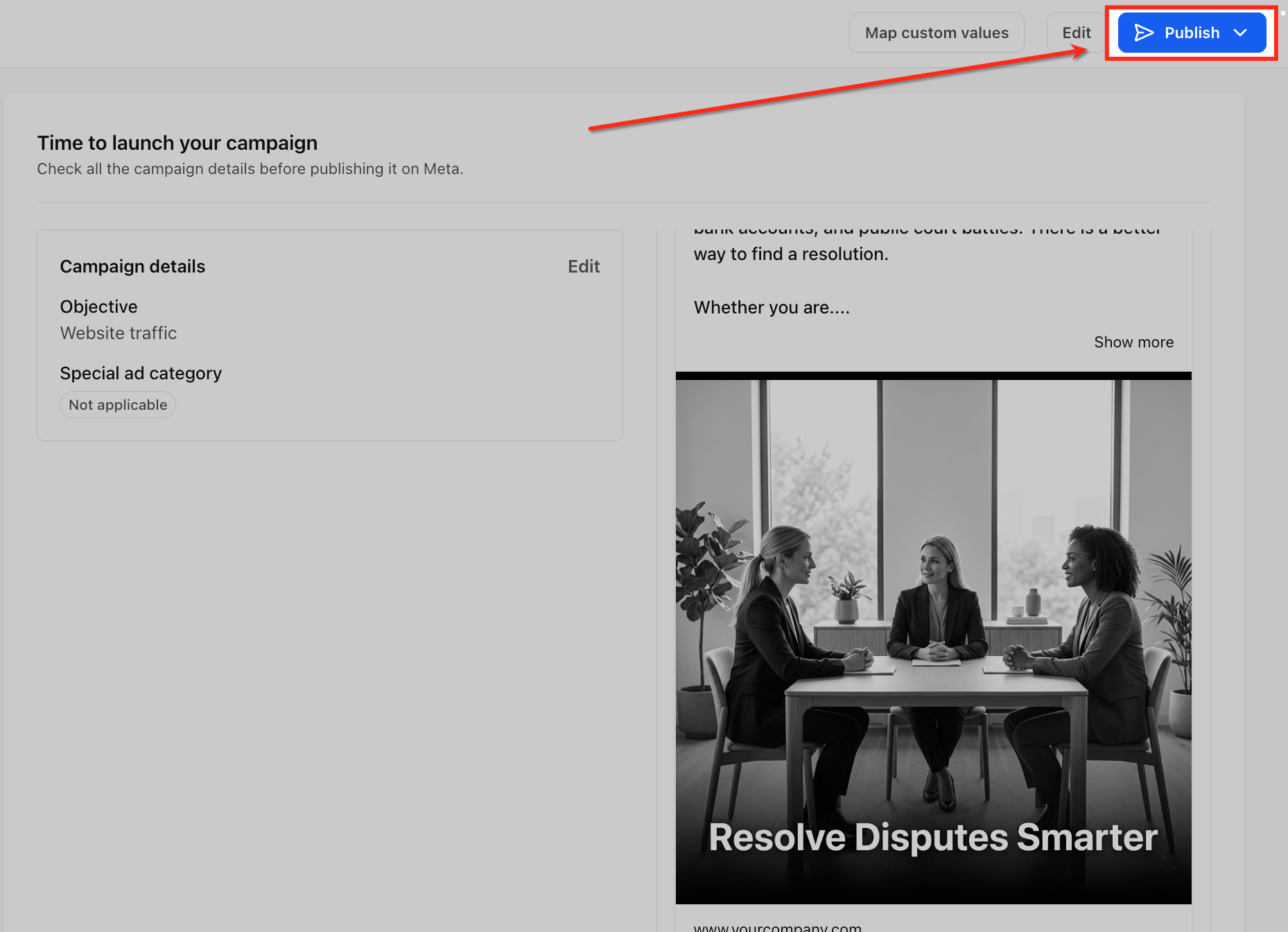
Publish the campaign when ready
Once you have reviewed the score and made any needed changes, complete your final campaign review and publish when ready.
Opportunity Score helps with pre-launch readiness, but it does not guarantee campaign delivery, conversions, revenue, or performance. After publishing, use Ad Manager statistics to measure actual campaign results.
Note: Opportunity Score provides guidance to help improve campaign readiness. It does not predict or guarantee delivery, conversions, or campaign performance. After publishing, use Ad Manager statistics to measure actual campaign performance.
Frequently Asked Questions
Q: Does Opportunity Score publish or edit my campaign automatically?
No. Opportunity Score only provides guidance. It does not automatically change campaign settings, publish the campaign, or apply recommendations for you.
Q: Can I publish a campaign with a Low Opportunity Score?
Yes. A high score is not required to publish. However, reviewing the recommendations before launch can help you identify setup gaps that may need attention.
Q: Does Opportunity Score guarantee better campaign performance?
No. Opportunity Score is a pre-launch setup guidance tool. It does not predict or guarantee delivery, conversions, revenue, or future campaign performance.
Q: Why did my Opportunity Score change after editing my campaign?
The score may update when you change setup details such as budget, audience, creative, or tracking. Return to the Review screen after making updates to review the latest score and recommendations.
Q: Do I need to fix every recommendation?
No. Recommendations are guidance, not required actions unless they relate to a required campaign setup field. Use your campaign goal and business context to decide which recommendations to apply.
Q: What happens when I click Fix?
Clicking Fix takes you to the related section of the campaign builder where you can review or update that part of the campaign setup.
Q: Does Opportunity Score measure live campaign performance?
No. Opportunity Score helps review campaign readiness before publishing. Use Ad Manager statistics after launch to evaluate live or published campaign performance.
Q: Is Opportunity Score available for Google Ads campaigns?
Yes, it is available for Meta, Google and LinkedIn ad campaigns as well.
Related Articles
- Ad Manager: Create New Facebook Ad Campaigns
- Ad Manager: Campaign Budget Definition
- How to Use Audience Controls in HighLevel Ad Manager
- How to View Advanced Preview and Get Shareable Preview Links for Meta Ads
- Ad Manager - Statistics of Ad Campaigns
- How to Use Opportunity Score in Ad Manager
Was this article helpful?
That’s Great!
Thank you for your feedback
Sorry! We couldn't be helpful
Thank you for your feedback
Feedback sent
We appreciate your effort and will try to fix the article