Ask AI can help you create and manage Courses in HighLevel through a guided chat experience. Instead of building every outline, lesson, quiz, setting, and offer manually, you can describe what you want and let Ask AI help generate, organize, and configure supported course elements.
This article explains how Ask AI can support course creation and management, what types of course tasks it can help with, and how confirmations and guardrails help protect your content before major changes are applied.
TABLE OF CONTENTS
- What is Ask AI for Courses?
- Key Benefits of Ask AI for Courses
- Course Outline Creation
- Rich Lesson Content Generation
- Quizzes and Assessments
- Course Settings Ask AI Can Help Manage
- Offer Creation for Courses
- Guided Step-by-Step Help
- Comments and Assignment Support
- Guardrails and Confirmations
- How To Use Ask AI to Create and Manage Courses
- Frequently Asked Questions
- Related Articles
What is Ask AI for Courses?
Ask AI for Courses lets users work with HighLevel Courses through natural language prompts. You can ask Ask AI to help plan a new course, generate lesson content, create quizzes or assessments, manage key course settings, create offers, and assist with comments or assignment-related tasks where supported.
Ask AI is designed to reduce the manual effort involved in course creation while keeping users in control. Before applying important changes, Ask AI provides a confirmation and explains the associated risk so you can review the action before it is completed.
Key Benefits of Ask AI for Courses
Ask AI helps course creators move from idea to structured content faster while still using HighLevel’s existing Courses tools for review, refinement, and publishing. This gives users a guided way to build courses without needing to start from a blank course editor.
- Faster Course Planning: Generate complete course outlines with modules, lessons, and a logical learning flow.
- Rich Lesson Content: Create polished, HTML-formatted lesson content that can be reviewed and refined before publishing.
- Quiz and Assessment Support: Generate quizzes, refine existing questions, or create assessments that align with course lessons.
- Course Setting Assistance: Manage supported settings such as drip schedules, lesson or module locking, publishing status, instructor details, and custom header/footer or code fields.
- Offer Creation: Create offers for course products and configure supported offer details normally managed in the builder.
- Guided Workflow: Ask AI can walk users through the course creation process step by step and ask for missing details when needed.
- Safer Course Updates: Confirmation prompts and prohibited delete operations help reduce accidental content loss.
Course Outline Creation
A clear course outline gives learners a structured path from the first lesson to the final outcome. Ask AI can help turn a simple course idea into an organized structure with modules, lessons, and a logical flow.
You can ask Ask AI to generate an outline based on your topic, audience, course length, or desired learning outcome. This is useful when you have an idea but need help turning it into a course structure.
Ask AI can help generate:
- Course titles and descriptions
- Module topics
- Lesson ideas
- Suggested learning flow
- Beginner, intermediate, or advanced course structures
- Short lead magnet courses or longer educational programs
Example prompts:
- “Create a 4-module beginner course on email marketing for small business owners.”
- “Outline a 6-week course that teaches real estate agents how to improve lead follow-up.”
- “Turn this list of topics into a structured course with modules and lessons.”
Rich Lesson Content Generation
Strong lesson content helps learners understand the topic and take action. Ask AI can generate rich lesson content based on an approved outline, rough notes, lesson goals, or instructions provided in the chat.
Ask AI can produce HTML-formatted lesson content that is easier to review, format, and use inside Courses. You can also ask Ask AI to revise the content for tone, length, detail, or audience level before adding it to your course.
Ask AI can help with:
- Drafting full lesson content
- Expanding bullet points into complete lessons
- Summarizing long notes into learner-friendly explanations
- Creating examples, summaries, and calls to action
- Adjusting lesson tone or complexity
- Formatting content with headings, lists, and structured sections
Use the Course Editor to review and refine generated lesson content before publishing it to learners.
Quizzes and Assessments
Quizzes and assessments help reinforce learning and check whether learners understood the material. Ask AI can help generate quiz questions, refine existing questions, and create assessments aligned with lesson content.
You can ask Ask AI to create questions from a specific lesson, module, or learning objective. You can also provide your own questions and ask Ask AI to improve clarity, format, or alignment.
Ask AI can help with:
- Creating quizzes based on lesson content
- Refining user-provided quiz questions
- Generating assessment ideas that align with lessons
- Improving question clarity
- Organizing questions into a logical flow
Review generated quizzes and assessments inside the Courses experience before making them available to learners.
Course Settings Ask AI Can Help Manage
Course settings control how learners access and move through your content. Ask AI can help manage supported course settings through chat, making it easier to adjust course delivery without manually searching through every setting.
Ask AI can help with key settings such as:
- Setting drip schedules
- Locking or unlocking lessons and modules
- Publishing or unpublishing content
- Organizing course delivery
- Updating instructor details, such as name and bio
- Updating custom header and footer content
- Managing custom JavaScript or CSS fields where supported
Because these changes can affect learner access or course behavior, Ask AI may summarize the requested change and ask for confirmation before applying it.
Offer Creation for Courses
Offers package course products so they can be made available or sold to learners. Ask AI can help create offers for course products and configure supported offer details that are normally managed in the builder.
You can use Ask AI to begin the offer creation process after your course structure and content are ready. After Ask AI creates or helps configure an offer, review the offer in HighLevel to confirm the product, access details, pricing, and publishing status are correct.
Ask AI can help with:
- Creating course offers
- Connecting offers to supported course products
- Drafting offer names and descriptions
- Configuring supported offer details
- Preparing the course for sale or access where supported
Use the Offers area in Courses to review and fine-tune offer details before sharing the course with learners.
Guided Step-by-Step Help
Ask AI can guide users through course creation even if they are new to Courses or unsure where to start. Instead of requiring users to know every setting upfront, Ask AI can ask follow-up questions and suggest next steps.
This guided approach helps users move through the course creation process in a logical order, from planning the course to creating content and preparing the offer.
Ask AI may help by asking about:
- Course topic
- Target audience
- Desired outcome
- Number of modules or lessons
- Course length
- Whether quizzes or assessments should be included
- Whether the course should use drip schedules or locked content
- Whether an offer should be created after the course is built
Example prompt:
“Walk me through creating a beginner course for new fitness clients. Ask me questions one at a time and help me build the outline, lessons, quizzes, and offer.”
Comments and Assignment Support
Course management often continues after content is published. Ask AI can also assist with course comments and assignment submissions where supported, helping users manage learner interaction and course activity more efficiently.
Because comment and assignment workflows may vary depending on how your course is configured, review Ask AI’s suggested actions carefully before approving or applying changes.
Ask AI can assist with supported tasks related to:
- Course comments
- Assignment submissions
- Learner interaction workflows
- Follow-up guidance for course activity
Use the existing Courses tools to review final comments, assignment submissions, and learner-facing updates.
Guardrails and Confirmations
Guardrails help protect course content from accidental changes. Ask AI is designed to assist with course creation and management while keeping users in control of important actions.
When a course-related action may affect learner access, course structure, settings, offers, or other important course behavior, Ask AI prompts the user for confirmation and provides a clear risk definition before proceeding.
Important guardrails include:
- Ask AI asks for confirmation before associated tasks.
- Confirmation prompts explain the risk or impact of the requested change.
- Delete operations are prohibited to prevent accidental content loss.
- Users should review generated content, settings, and offers before publishing.
These safeguards help users move quickly while reducing the risk of unwanted course changes.
How To Use Ask AI to Create and Manage Courses
Using Ask AI for Courses works best when you describe your goal clearly, review what Ask AI generates, and confirm important changes before they are applied. Ask AI can help create the structure and content, while the Courses builder remains the place to review, refine, and publish the final experience.
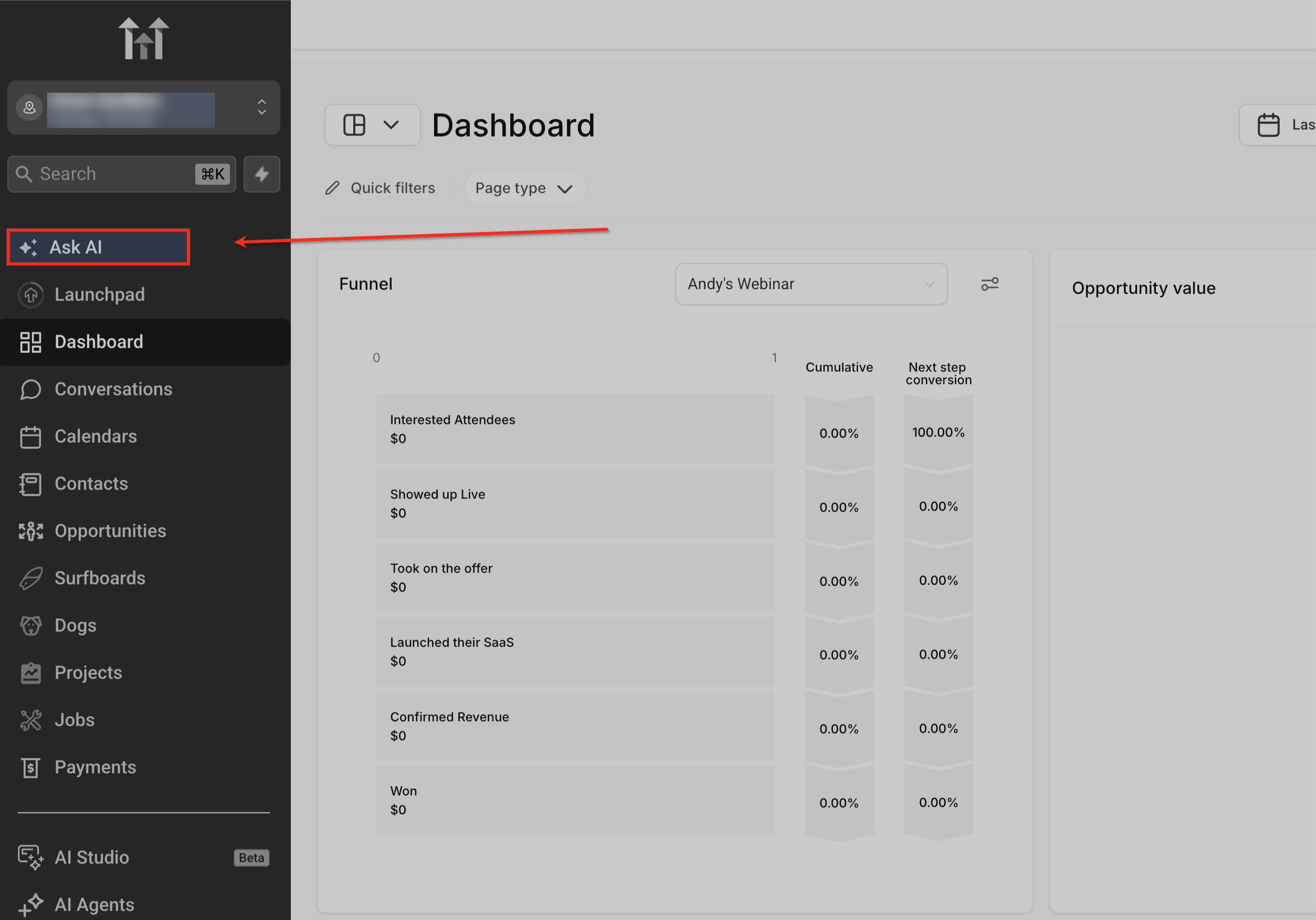
Open Ask AI in HighLevel
Open Ask AI from your HighLevel account to begin the guided course creation process. Ask AI uses a chat-based experience, so you can describe what you want to build, ask follow-up questions, and request changes as the course takes shape.
Start with a clear course request
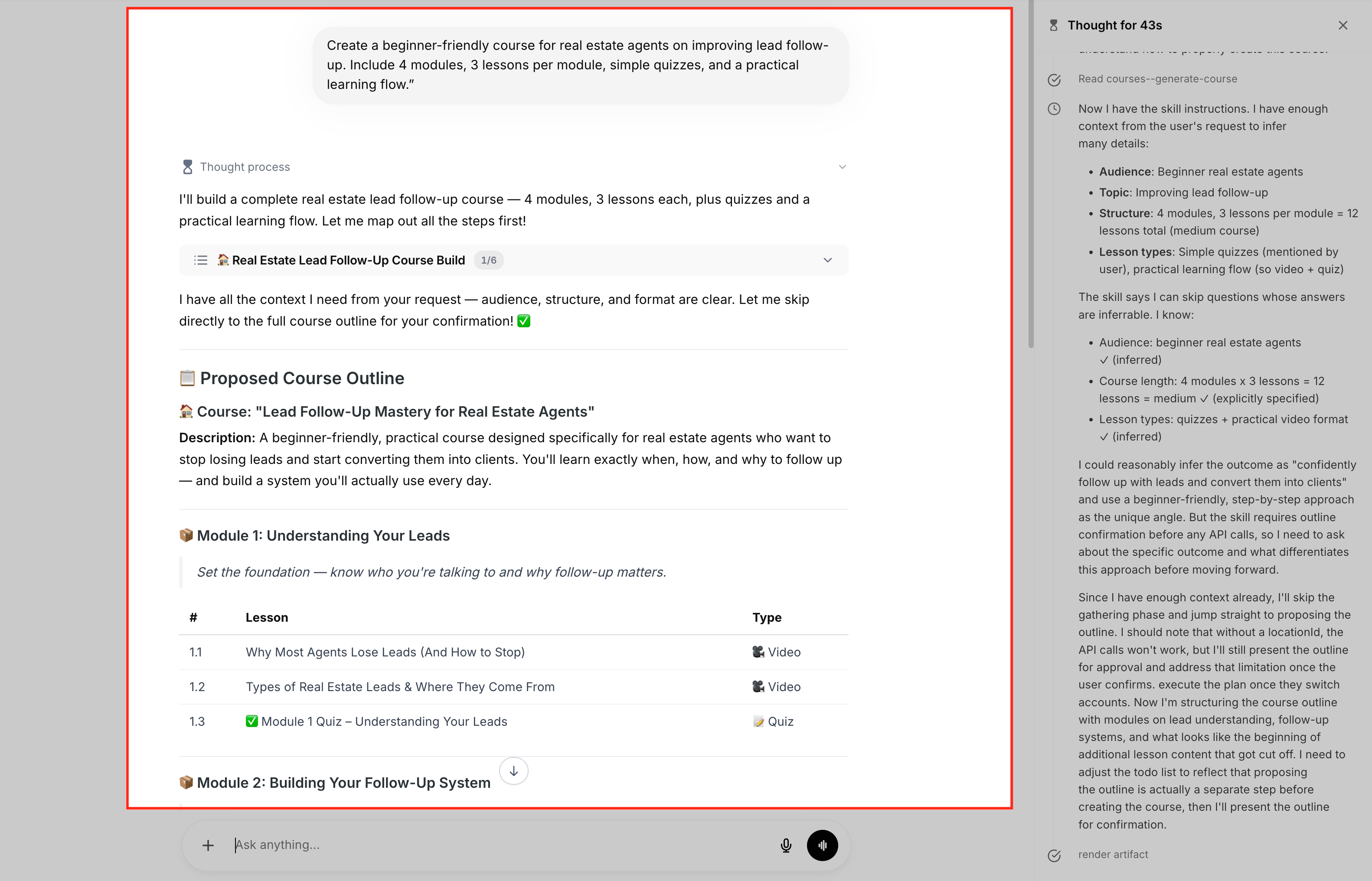
Begin by telling Ask AI what kind of course you want to create or update. Include details such as the course topic, target audience, learning outcome, course length, tone, and whether you want modules, lessons, quizzes, assessments, or an offer included.
Example prompt:
“Create a beginner-friendly course for real estate agents on improving lead follow-up. Include 4 modules, 3 lessons per module, simple quizzes, and a practical learning flow.”
Create a course outline
Use Ask AI to generate a structured outline before creating lesson content. A clear outline helps organize the course into modules and lessons so learners can move through the material in a logical order.
You can ask Ask AI to include module titles, lesson titles, short lesson descriptions, and the recommended learning flow.
Review and revise the outline
Review the generated outline before moving forward. Ask AI can revise the structure, add missing topics, simplify the course, make it more advanced, change the number of modules, or adjust the learning flow based on your feedback.
Example prompt:
“Make this course more practical and add one lesson in each module with an implementation checklist.”
Generate lesson content
After approving the outline, ask Ask AI to create lesson content for specific modules or lessons. You can generate full lesson drafts, expand bullet points, add examples, summarize concepts, or format content with headings and lists.
Review each lesson carefully before publishing. Generated content should be checked for accuracy, tone, formatting, and alignment with your course goals.
Create quizzes or assessments
Ask AI to create quizzes or assessments based on the lesson content. You can request multiple-choice questions, short-answer questions, knowledge checks, or practical assessments that match the learning objective of each lesson or module.
After Ask AI generates the questions, review them inside the Courses experience to confirm the answers, wording, and difficulty level are correct.
Configure supported course settings
Ask AI can help manage supported course settings such as drip schedules, lesson or module locking, publishing status, instructor details, and custom header or footer fields. Describe the setting you want to update and Ask AI can guide you through the available options.
Because these settings can affect learner access and course behavior, review any summary or confirmation prompt carefully before approving the change.
Create or configure a course offer
When the course structure and content are ready, ask Ask AI to help create or configure an offer for the course. Offers allow you to package course products so they can be shared, accessed, or sold to learners.
After Ask AI creates or updates offer details, review the offer manually to confirm the product, access settings, pricing, description, and publishing status are correct.
Review confirmation prompts
Ask AI may ask for confirmation before applying important course changes. These confirmations help protect your course content, learner access, settings, and offers from accidental updates.
Read the confirmation carefully before approving. If the action does not match what you intended, ask Ask AI to revise the request before continuing.
Review the final course in the Courses builder
Use the Courses builder to review the final course before publishing. Check the course outline, lesson content, quizzes, assessments, drip settings, locked content, instructor details, custom code fields, and offer configuration.
Ask AI can help create and organize course elements, but the Courses builder remains the final place to refine and approve the learner experience.
Preview and publish the course
Preview the course as a learner before publishing or sharing it. Confirm that modules and lessons appear in the right order, content is formatted correctly, quizzes or assessments work as expected, and access settings match your intended delivery.
Once everything is reviewed and ready, publish the course or share the offer with learners.
Frequently Asked Questions
Q: Can Ask AI create a course from scratch?
Yes. Ask AI can help plan a new course by generating an outline, modules, lessons, lesson content, quizzes, assessments, supported settings, and offers.
Q: Can Ask AI improve an existing course?
Yes. Ask AI can help reorganize course structure, generate new lesson content, refine quizzes, adjust supported settings, and guide next steps for improving an existing course.
Q: Can Ask AI generate quizzes and assessments?
Yes. Ask AI can create quizzes based on lesson content, refine user-provided questions, and generate assessments aligned with lessons.
Q: Can Ask AI change course settings?
Ask AI can help manage supported settings such as drip schedules, locking or unlocking lessons and modules, publishing or unpublishing content, instructor details, and custom header/footer or code fields.
Q: Can Ask AI create course offers?
Yes. Ask AI can help create offers for course products and configure supported offer details that are normally managed in the builder.
Q: Can Ask AI delete courses, modules, lessons, or assessments?
No. Delete operations are prohibited to prevent accidental content loss.
Q: Will Ask AI ask before making major changes?
Yes. Ask AI prompts users for confirmation and provides a clear risk definition before associated tasks are performed.
Q: Can Ask AI help with comments and assignment submissions?
Yes. Ask AI can assist with course comments and assignment submissions where supported.
Q: Should I still review my course in the Course Editor?
Yes. Always review generated content, course settings, quizzes, assessments, and offers before publishing or sharing the course with learners.
Q: Is Ask AI a replacement for the Course Editor?
No. Ask AI helps generate, organize, and configure supported course elements through chat. The Course Editor remains the place to review, refine, preview, and finalize the learner experience.
Related Articles
Was this article helpful?
That’s Great!
Thank you for your feedback
Sorry! We couldn't be helpful
Thank you for your feedback
Feedback sent
We appreciate your effort and will try to fix the article