Ask AI Memory helps personalize future Ask AI conversations in HighLevel by saving reusable context, preferences, and instructions. Memories can include details about your role, business, tone preferences, formatting style, or recurring instructions you want Ask AI to remember. This helps Ask AI provide more relevant responses without requiring you to repeat the same context each time.
TABLE OF CONTENTS
- What is Ask AI Memory?
- Key Benefits of Ask AI Memory
- When To Use Ask AI Memory
- Ask AI Memory vs. Other Ask AI Context
- How Ask AI Saves Memories
- How Ask AI Uses Saved Memories
- Memory Scope and Source Details
- How To Set Up Ask AI Memory
- Frequently Asked Questions
- Related Articles
What is Ask AI Memory?
Ask AI Memory is a personalization feature that stores useful context from your Ask AI interactions. These saved memories help Ask AI tailor future responses based on information that is relevant to you, your work, or your preferred way of using HighLevel.
Memories are designed for reusable context, not every message in a conversation. Examples include your role, preferred response style, business details, workflow preferences, or instructions you want Ask AI to consider in future conversations.
Key Benefits of Ask AI Memory
Ask AI Memory helps make future Ask AI responses more useful by reducing repeated setup and context sharing. Instead of explaining the same preferences in every conversation, you can let Ask AI use saved context when it is relevant.
Personalized responses: Ask AI can use saved details to tailor answers to the user’s business, role, location, and preferences.
Less repeated context: Users do not need to re-enter the same background information in every new session.
Smarter follow-up conversations: Recent memories are included in AI requests so future responses can start with better context.
Automatic memory capture: Ask AI can save meaningful facts in the background without interrupting the main response.
Memory import support: Users can import saved memory details from other AI providers, such as ChatGPT or Claude, when available.
User-level organization: Memories are scoped to the user and can include optional company or location context.
- Bring context from other tools: Import useful memories from supported AI providers when available.
When To Use Ask AI Memory
Ask AI Memory is most useful for details that should influence future conversations repeatedly. Saving reusable context helps Ask AI respond in a way that better matches your role, business, and working style.
Use Ask AI Memory for:
- Your role, team, or department context.
- Business or location-specific details.
- Preferred tone, formatting, or writing style.
- Recurring instructions for Ask AI.
- Workflow preferences.
- Repeated project or operational context.
- Personalizing Ask AI responses across future conversations.
- Importing useful context from another AI provider.
Ask AI Memory vs. Other Ask AI Context
Ask AI can use different types of context depending on the workflow. Understanding the difference helps users know what Memory does and what it does not replace.
- Ask AI Memory: Saves reusable context that can influence future Ask AI conversations.
- Chat history: Lets users return to previous Ask AI conversations without losing their place.
- Smart Session Memory: Keeps editing context during a specific conversational editing workflow.
- Feedback: Rates a specific Ask AI response and is not the same as saving a memory.
- Ask AI actions: Use available tools or workflows to complete supported tasks. Memory can help personalize context, but users should still review important outputs, changes, and approvals.
How Ask AI Saves Memories
Ask AI Memory is designed to capture useful, reusable information instead of saving every message. This helps keep memories focused on facts that can improve future conversations.
After user messages, Ask AI can identify one meaningful fact and save it as memory. Examples may include:
User role or job function
Company or business details
Location details
Communication preferences
Repeated instructions or preferences
Relevant business context shared by the user
Ask AI skips one-time requests, duplicate information, and details that are not useful for future conversations.

How Ask AI Uses Saved Memories
Saved memories help Ask AI respond with context without requiring the user to repeat details in every chat. Ask AI uses memory naturally in the response instead of announcing that it remembered something.
Ask AI includes the most recent saved memories in future AI requests. These memories help Ask AI personalize answers, recommend next steps, and adjust responses based on known user or business context.
Example:
If a user previously shared their company name and industry, Ask AI can use that context when helping with marketing copy, strategy, or business planning.
If a user shared a preferred tone or instruction, Ask AI can apply that preference in future responses when relevant.
Memory Scope and Source Details
Memory scope determines where a saved memory applies. This helps Ask AI use the right context for the right user, location, or company.
Memories are scoped to a user ID. Memories may also include optional location or company context when applicable. Each memory is tagged by source so the system can identify how the memory was created.
Memory sources may include:
Auto-created memory
Explicitly saved memory
Imported memory
System-created memory
How To Set Up Ask AI Memory
Proper setup ensures Ask AI has the right user context and gives users control over saved memory details. Users should review saved memories when business details, preferences, or instructions change.
Open Ask AI in HighLevel.
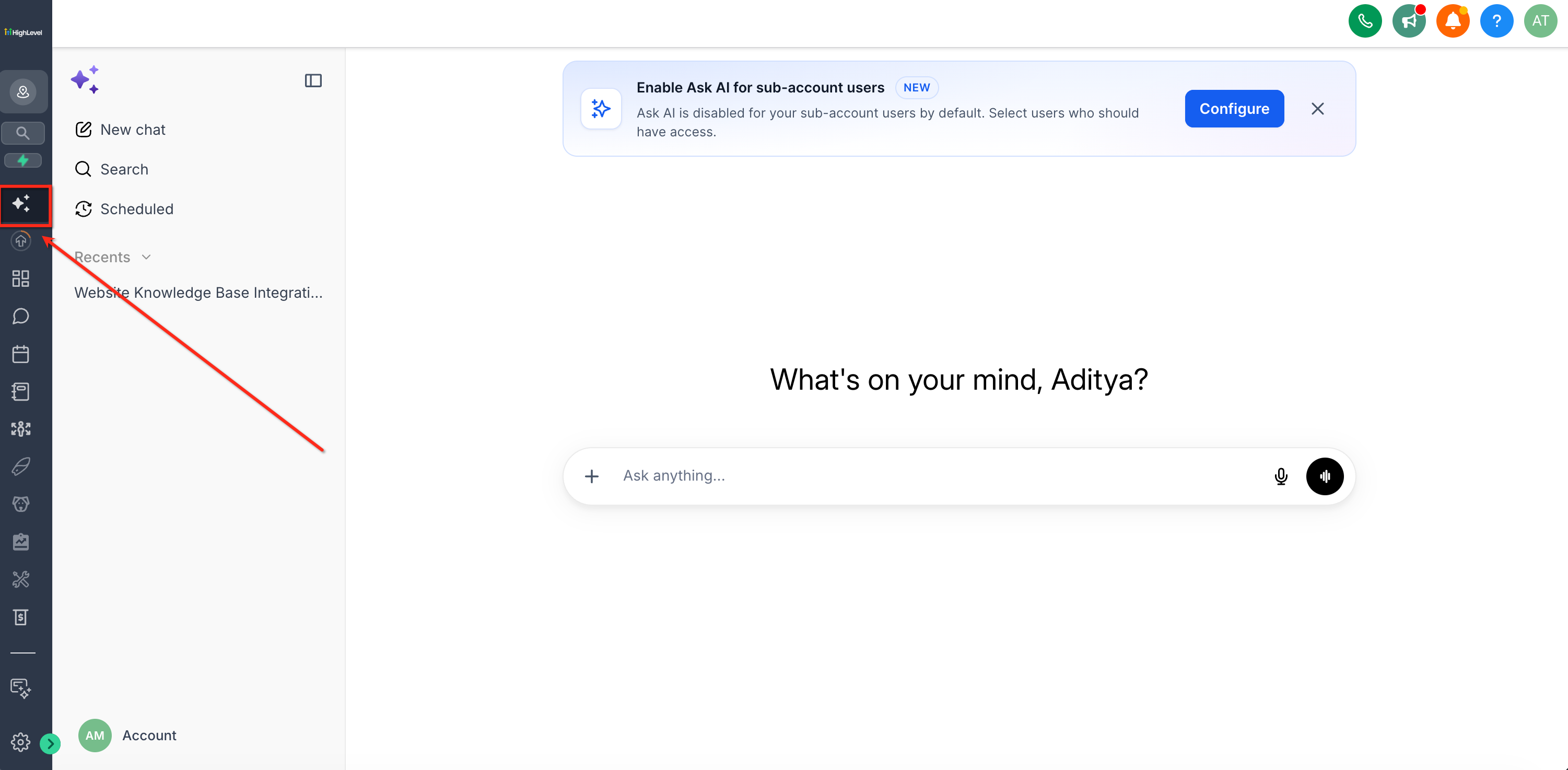
Click on Account > Personalization. Select Memory > Manage.

Search or review the saved memory list.

Delete any memory that is outdated or no longer needed.

To import memory details, click Import memories.
Copy the provided prompt into the other AI provider.
Paste the returned memory details into the import field.
Click Add to memory.

Frequently Asked Questions
Q: Does Ask AI save every message as memory?
No. Ask AI Memory is intended for reusable context, preferences, and instructions. It does not need to save every message from a conversation.
Q: Can I ask Ask AI to remember something?
Yes. You can explicitly ask Ask AI to remember useful context by saying something like, “Remember that I prefer concise bullet points.”
Q: Can I delete a memory?
Yes. You can review and delete saved memories from Memory settings.
Q: How many memories can Ask AI use at once?
Memory V1 uses the 20 most recent memories in AI requests.
Q: How many memories can I import?
Users can import up to 100 memories at once.
Q: Is Ask AI Memory the same as chat history?
No. Chat history lets you return to previous conversations. Ask AI Memory stores reusable context that can personalize future responses.
Q: Is Ask AI Memory the same as Smart Session Memory?
No. Ask AI Memory saves reusable context across future Ask AI conversations. Smart Session Memory keeps editing context during a specific conversational editing workflow.
Q: Is feedback the same as memory?
No. Feedback rates a specific Ask AI response. Memory stores reusable context, preferences, or instructions for future conversations.
Q: What should I avoid saving as memory?
Avoid saving one-time tasks, outdated information, duplicate details, or sensitive information that should not influence future Ask AI responses.
Q: Can I import memories from ChatGPT or Claude?
Yes, Ask AI Memory supports importing memories from supported AI providers when the import workflow is available.
Q: Why did Ask AI use outdated information?
An outdated memory may still be saved. Review Memory settings, delete outdated entries, and add updated context if needed.
Related Articles
Was this article helpful?
That’s Great!
Thank you for your feedback
Sorry! We couldn't be helpful
Thank you for your feedback
Feedback sent
We appreciate your effort and will try to fix the article