Pipeline, Stage, and Opportunity IDs are unique identifiers that can be used when working with HighLevel APIs, webhooks, imports, external integrations, audit logs, and other technical workflows. You typically do not need to enter these IDs when working directly inside the HighLevel interface because pipelines and stages can usually be selected by name. Knowing where these IDs fit becomes important when another system or process specifically requires them.
TABLE OF CONTENTS
- What Are Pipeline, Stage, and Opportunity IDs?
- Key Benefits of Understanding HighLevel IDs
- When Do You Need Pipeline, Stage, or Opportunity IDs?
- How Pipeline, Stage, and Opportunity IDs Relate to Each Other
- How to Find Pipeline and Stage IDs
- How to Find an Opportunity ID
- Find the Opportunity ID From the URL
- Using IDs With Opportunity Imports
- Using IDs With APIs and External Integrations
- How to Find and Use the Correct ID
- Frequently Asked Questions
What Are Pipeline, Stage, and Opportunity IDs?
Pipeline, Stage, and Opportunity IDs identify different parts of the opportunity-management structure in HighLevel. Understanding what each ID represents helps you use the correct identifier when configuring integrations, updating records, or troubleshooting opportunity activity.
- Pipeline ID: Identifies a specific pipeline.
- Stage ID: Identifies a specific stage within a pipeline.
- Opportunity ID: Identifies one individual opportunity record.
These IDs are different from the names you see in the HighLevel interface. For example, a pipeline may be named Sales Pipeline, but its Pipeline ID is the unique system identifier associated with that pipeline.
Likewise, a stage may be named Qualified Lead, while its Stage ID identifies that specific stage within the pipeline.
Key Benefits of Understanding HighLevel IDs
Unique IDs give systems a reliable way to reference the correct pipeline, stage, or opportunity even when display names are changed or duplicated in other contexts. They are especially useful when HighLevel is exchanging data with another system.
- Accurate record identification: Reference the correct pipeline, stage, or opportunity when a technical process requires an exact identifier.
- API and integration support: Supply IDs to supported API endpoints, webhook processes, or external integrations when required.
- Opportunity updates: Identify an existing opportunity when performing supported update operations.
- Troubleshooting: Use identifiers to investigate specific pipelines or opportunities in supported audit and diagnostic workflows.
- Reliable automation: Prevent ambiguity when an external system needs to reference a particular HighLevel record.
When Do You Need Pipeline, Stage, or Opportunity IDs?
Most everyday work inside HighLevel does not require you to manually enter IDs. Understanding when IDs are necessary prevents you from searching for technical values when the HighLevel interface already provides a simpler option.
You may need an ID when working with:
HighLevel APIs
Webhooks
Zapier or another supported external integration
Opportunity imports or updates
Audit logs
Custom technical workflows
Redirects or links to a specific opportunity
For standard opportunity creation inside HighLevel, you normally select the Pipeline and Pipeline Stage directly from their available values.
The same applies to standard HighLevel workflow actions. For example, the Create Opportunity workflow action lets you select the Pipeline and Pipeline Stage directly, so you do not need to manually enter a Stage ID for that use case.
Important: Do not assume that every integration or API request requires all three IDs. Always check the requirements of the specific endpoint, webhook, import, or integration you are configuring.
How Pipeline, Stage, and Opportunity IDs Relate to Each Other
Pipelines, stages, and opportunities form a hierarchy. Understanding this relationship makes it easier to determine which ID an external process is asking for.
A typical structure looks like this:
Pipeline
Stage
Stage
Stage
Opportunity
Opportunity
For example:
Pipeline: Sales Pipeline
Stage: Qualified Lead
Opportunity: ACME Website Redesign
The Pipeline ID identifies Sales Pipeline.
The Stage ID identifies the Qualified Lead stage within that pipeline.
The Opportunity ID identifies the individual ACME Website Redesign opportunity.
A Stage ID should not be confused with the stage name. A name is the label displayed to users, while the ID is the system identifier associated with that stage.
How to Find Pipeline and Stage IDs
Pipeline and Stage IDs are primarily relevant when a technical process requires their underlying system identifiers. HighLevel does not require these IDs for normal pipeline or opportunity management because pipelines and stages can be selected by name throughout the standard interface.
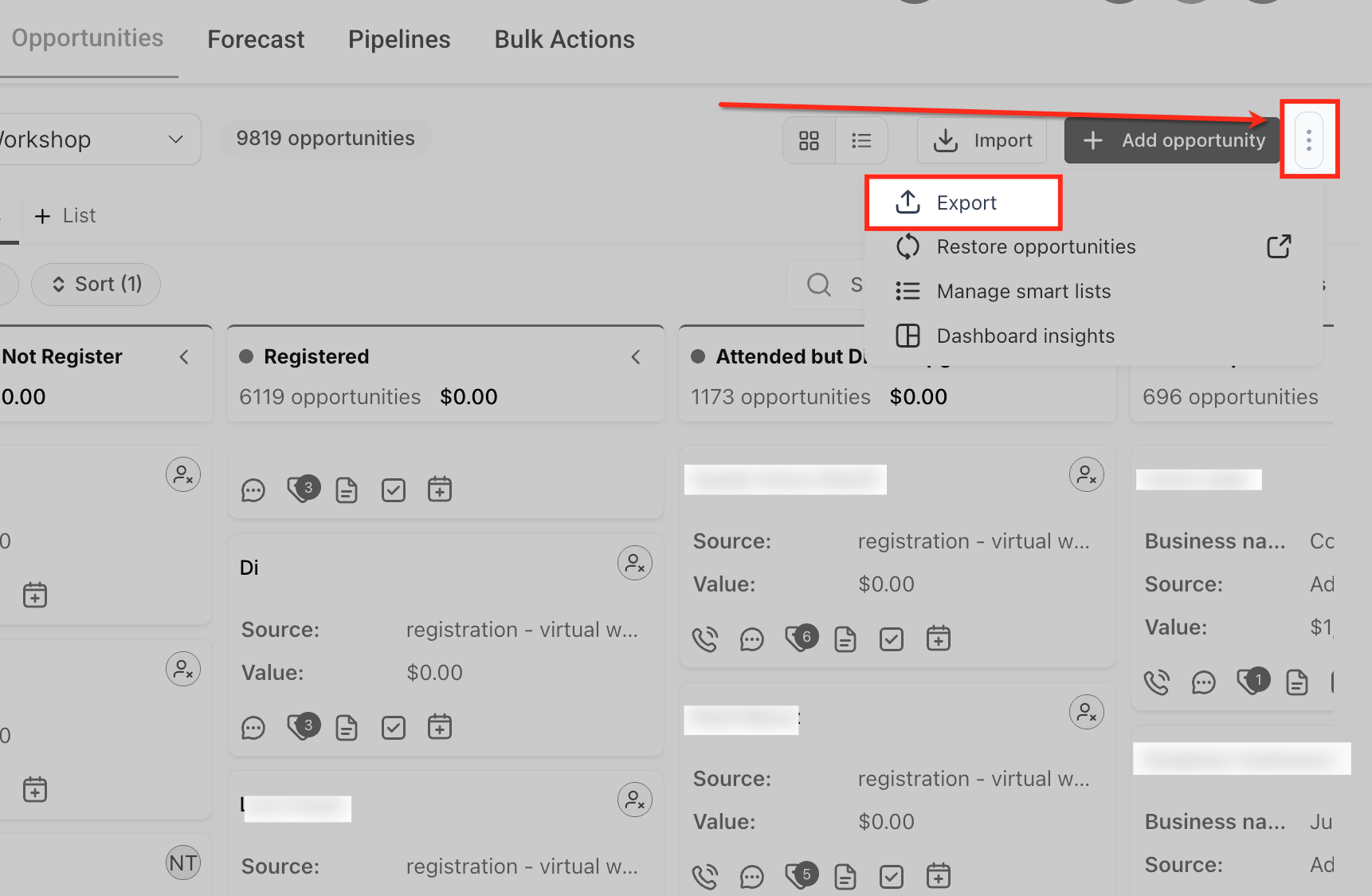
If you need Pipeline or Stage IDs outside of a supported API response or integration, HighLevel documents exporting opportunities as the native method for retrieving this information.
To export opportunities:
Go to Opportunities.
Click the three-dot menu in the upper-right area.
Select Export Opportunities.
Allow HighLevel to process the export.
Open the exported file and review the available opportunity, pipeline, and stage data required for your use case.
If you are using an API, webhook, Zapier, or another external integration, the relevant Pipeline or Stage ID may also be returned or required by that specific process. Follow the current documentation for that endpoint or integration rather than assuming a particular ID format.
Important: The older Zapier-specific workflow for retrieving these IDs should not be treated as the only method. The exact steps can vary based on the integration or API operation being used.
Pipeline ID
A Pipeline ID uniquely identifies one pipeline in a HighLevel sub-account. It is useful when a technical process needs to reference the pipeline itself rather than simply displaying or selecting its name.
Pipeline IDs may be used for:
API requests that operate on a specific pipeline
External integrations that require pipeline identification
Webhook or data-processing workflows
Supported audit-log or troubleshooting use cases
For ordinary pipeline management, you do not need the Pipeline ID.
To manage pipelines directly in HighLevel, go to:
Opportunities > Pipelines
From there, you can create, rename, reorder, and manage pipeline stages without working with IDs.
Stage ID
A Stage ID uniquely identifies a specific stage within a pipeline. It is most useful when an API or external integration requires the system identifier rather than the stage's display name.
For example, a pipeline may contain stages named:
New Lead
Qualified
Proposal Sent
Closed
Each stage has its own system identifier.
You generally do not need a Stage ID when working directly inside HighLevel. Standard opportunity and workflow configuration lets you choose a stage by name.
For example, when creating an opportunity manually, you select:
The Pipeline
The Pipeline Stage
The opportunity's remaining details
Similarly, the Create Opportunity workflow action lets you select the Pipeline and Pipeline Stage directly.
Use a Stage ID only when the specific external process you are configuring explicitly requires it.
How to Find an Opportunity ID
Opportunity ID uniquely identifies a single opportunity record. Unlike Pipeline and Stage IDs, the Opportunity ID is directly visible from the opportunity experience and is commonly used for audit logs, direct links, imports, and technical integrations.
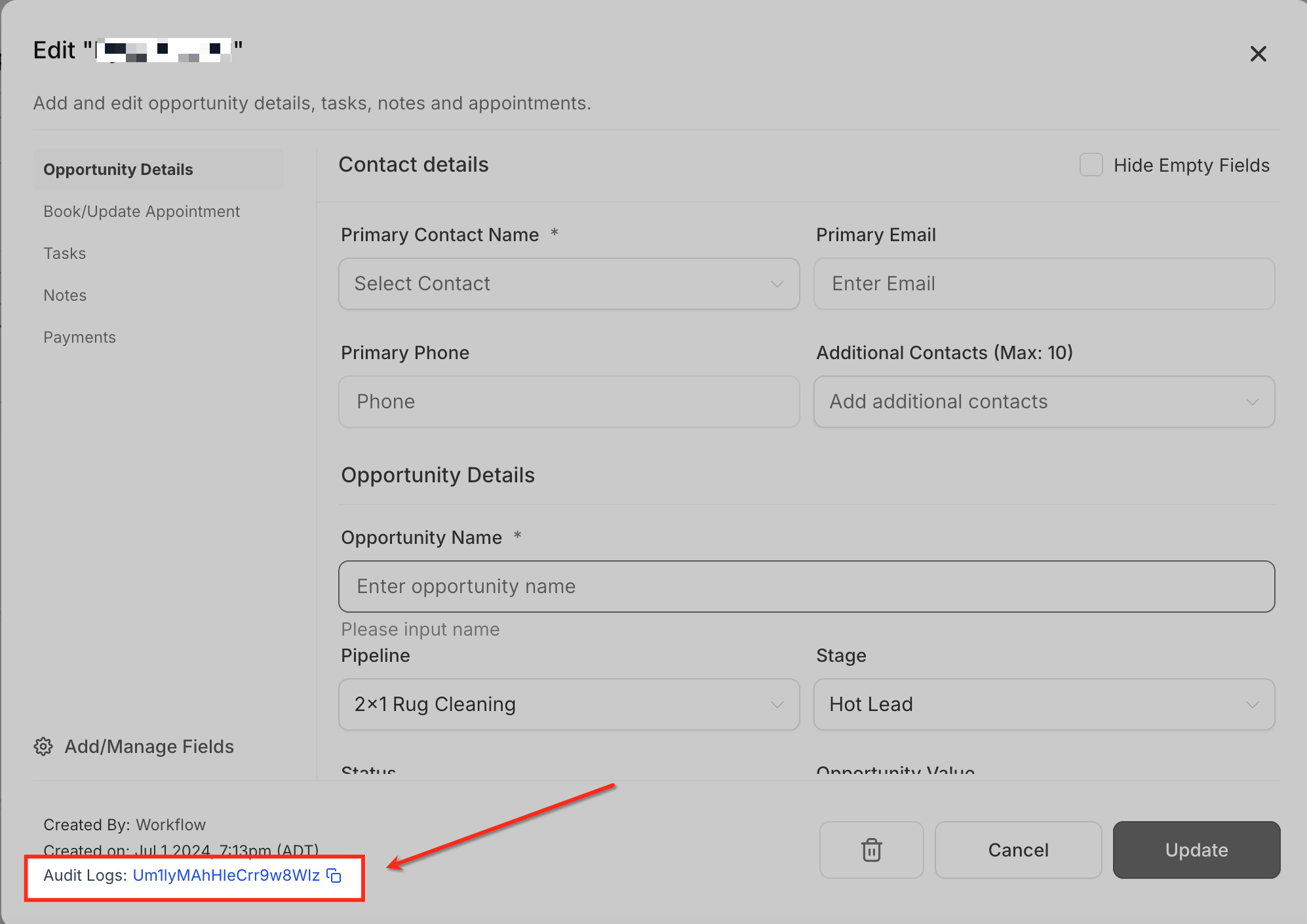
To find the Opportunity ID:
Go to Opportunities.
Open the opportunity you want to inspect.
Locate the Opportunity ID displayed in the lower-left area of the opportunity.
Click the Opportunity ID when you want to open the related audit-log activity.
HighLevel's current Opportunities documentation confirms that selecting the Opportunity ID can take you to the audit logs for that opportunity.
Find the Opportunity ID From the URL
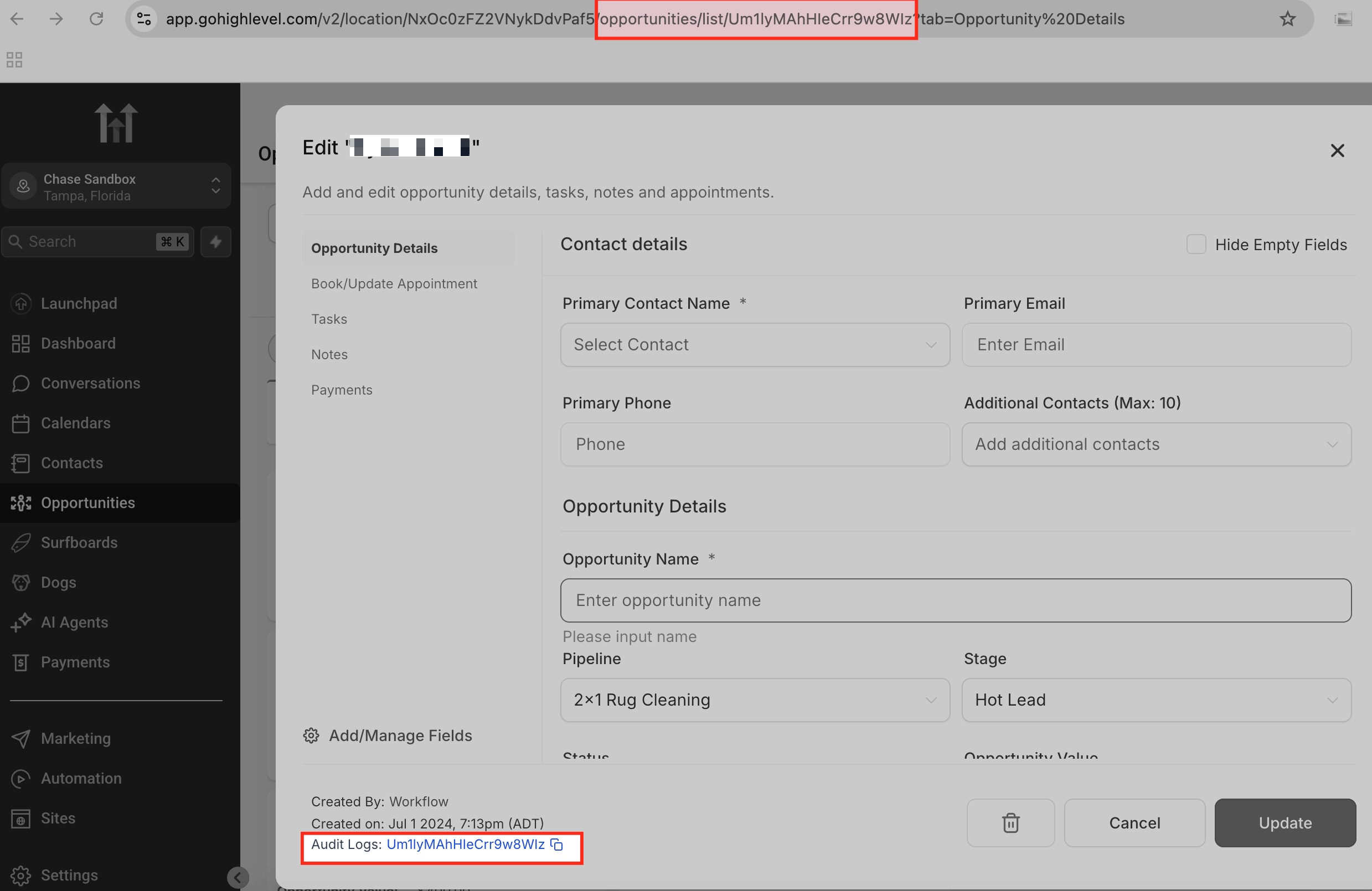
You can also identify the Opportunity ID from the opportunity's URL.
Open the specific opportunity.
Review the browser URL.
The identifier at the end of the opportunity URL corresponds to that opportunity record.
This method is also useful when sharing a direct link to a specific opportunity with another authorized HighLevel user.
Common Uses for Opportunity ID
Opportunity IDs are useful whenever a process needs to identify one specific opportunity rather than an entire pipeline or stage. This is especially important when updating or troubleshooting existing opportunity records.
Common uses include:
- Audit logs: Track activity related to a specific opportunity.
- Direct opportunity links: Open or share a link that points to one opportunity.
- Opportunity imports: Identify an existing opportunity when performing an update.
- API requests: Reference a specific opportunity when required by the endpoint.
- External integrations: Match an external record to the corresponding HighLevel opportunity.
When importing opportunities, include the Opportunity ID when the goal is to update an existing opportunity. If an Opportunity ID is not provided in an update scenario, HighLevel may create a new opportunity instead of updating the existing one.
Using IDs With Opportunity Imports
Opportunity ID can be used when updating existing opportunities through a CSV import. Including the correct identifier helps HighLevel match the imported row to the opportunity that should be updated.
For opportunity imports, HighLevel requires supported fields such as:
Contact ID
Opportunity Name
Pipeline
When updating an existing opportunity, include the Opportunity ID as part of the mapped data.
For the complete process, see How to Import Opportunities into HighLevel Using a CSV File.
Using IDs With APIs and External Integrations
APIs and external integrations may use IDs to reference HighLevel records without relying on display names. The exact identifier required depends on the operation being performed.
For example:
A pipeline-related request may require a Pipeline ID.
A stage-related request may require a Stage ID.
An opportunity update may require an Opportunity ID.
Always review the current documentation for the specific API endpoint or integration before supplying an ID.
HighLevel's current API documentation is maintained through its Marketplace API documentation. Legacy API behavior should not be used as the basis for new integrations.
Important: A Pipeline ID, Stage ID, and Opportunity ID are not interchangeable. Supplying the wrong identifier can cause an integration or API request to fail or reference the wrong resource.
How to Find and Use the Correct ID
Finding the right identifier starts with understanding which HighLevel object the external process needs to reference. Using the correct ID prevents unnecessary troubleshooting and helps ensure updates are applied to the intended record.
Determine whether the process is referencing a pipeline, stage, or individual opportunity.
Check whether the process can use a name directly instead of an ID.
If a Pipeline or Stage ID is required, retrieve the identifier through the supported export, API, webhook, or integration workflow you are using.
If an Opportunity ID is required, open the opportunity and retrieve the ID from the opportunity record or URL.
Confirm the ID requirement against the current integration or API documentation.
Test the workflow before applying it broadly.
Frequently Asked Questions
Q: Do I need a Pipeline ID when creating an opportunity inside HighLevel?
No. When creating an opportunity in the HighLevel interface, you select the Pipeline directly from the available options.
Q: Do I need a Stage ID when creating an opportunity?
Not for standard opportunity creation in HighLevel. You can select the Pipeline Stage by name. A Stage ID is generally needed only when an API or external integration specifically requires it.
Q: Is a Stage ID the same as a stage name?
No. The stage name is the label displayed in HighLevel, while the Stage ID is the unique system identifier associated with that stage.
Q: Can two pipelines have stages with similar names?
Yes. Because stages belong to pipelines, an external integration should use the identifier required by its configuration rather than assuming that a stage name uniquely identifies the correct stage.
Q: Where can I find an Opportunity ID?
Open the opportunity and locate the Opportunity ID in the opportunity details. The ID can also be identified from the end of the opportunity URL.
Q: Why would I need an Opportunity ID for an import?
When updating an existing opportunity through import, the Opportunity ID helps HighLevel identify which existing opportunity should be updated instead of creating a new one.
Q: Do all APIs and integrations require Pipeline, Stage, and Opportunity IDs?
No. Requirements depend on the specific endpoint or integration. Some operations allow you to select or provide names, while others require unique IDs.
Q: Can I use a Pipeline or Stage name instead of an ID?
In the HighLevel interface and standard HighLevel workflows, names can generally be selected directly. For APIs and external integrations, use the exact field format required by the relevant documentation.
Related Articles
Was this article helpful?
That’s Great!
Thank you for your feedback
Sorry! We couldn't be helpful
Thank you for your feedback
Feedback sent
We appreciate your effort and will try to fix the article