This article focuses on the SaaS Analytics tab in the Agency Dashboard and explains how to use it for day‑to‑day SaaS decision‑making. It also covers Monthly Recurring Revenue (MRR), including how MRR is defined, calculated, and visualized.
TABLE OF CONTENTS
- What is the SaaS Analytics in the Agency Dashboard?
- Key Benefits of the SaaS Analytics Tab
- Understanding Your SaaS Metrics
- How to Access and Read SaaS Analytics
- State Transitions → MRR Type
- Subscription Status Meanings
- What’s Included vs Excluded in HighLevel MRR
- Methodology & Currency Handling
- Frequently Asked Questions
- Related Articles
What is the SaaS Analytics in the Agency Dashboard?
Access requirement: SaaS Analytics is available exclusively to agencies on the $497 (Pro) plan.SaaS Analytics centralizes subscription KPIs so you can understand growth, retention, and plan performance at a glance. It aggregates revenue trends, MRR components, customer counts, plan mix, and cohorts to help you identify what’s working and where to intervene.
The SaaS Analytics tab gives agencies a deep analytical view of their SaaS business on HighLevel. It combines revenue and customer metrics with plan-level insights and cohorts so you can monitor MRR, churn, upgrades/downgrades, ARPA, and more—all in one place.
Key Benefits of the SaaS Analytics Tab
Visibility: Track MRR, Total SaaS Revenue, MRR by Plan, churn, upgrades, downgrades, cohorts, and ARPA in one view.
Better decisions: Evaluate plan design and pricing by watching MRR by Plan and ARPA trends.
Growth focus: Spot Expansion and Reactivation opportunities quickly.
Risk control: Detect Contraction and Churn early and act with targeted retention steps.
Operational efficiency: Event-based calculations reduce manual reconciliation and reliance on external tools.
Understanding Your SaaS Metrics
Use the metrics in SaaS Analytics to understand how your recurring revenue and customer base are changing over time.
| Metric | What it means | Why it matters |
|---|---|---|
| MRR | The monthly recurring revenue generated from eligible active SaaS subscriptions. Recurring charges are normalized to a monthly value. | Shows the current size of your recurring SaaS revenue base. |
| New MRR | Recurring revenue generated from customers starting a paid SaaS subscription for the first time. | Helps you understand revenue growth from newly acquired customers. |
| Expansion MRR | Additional recurring revenue generated when an existing customer increases their subscription value, such as by moving to a higher-priced plan. | Shows how much recurring revenue is growing within your existing customer base. |
| Contraction MRR | Recurring revenue lost when an existing customer moves to a lower subscription value without fully canceling. | Helps identify revenue decreases caused by downgrades or reduced subscription value. |
| Churned MRR | Recurring revenue lost when an existing paid subscription ends. | Shows how much recurring revenue is being lost through customer churn. |
| Reactivation MRR | Recurring revenue restored when a previously inactive SaaS subscription becomes active again. | Helps track revenue recovered from returning customers. |
| Total SaaS Revenue | The total SaaS revenue generated during the selected reporting period. | Provides a broader view of SaaS revenue alongside recurring revenue metrics such as MRR. |
| Total SaaS Customers | The number of SaaS customers represented in the selected reporting period. | Helps you track the size and growth of your SaaS customer base. |
| ARPA | Average Revenue Per Account shows the average revenue generated per SaaS account. | Helps you understand the average value of your SaaS customers and how that value changes over time. |
| Net MRR Churn Rate | Measures the recurring revenue lost from existing customers after accounting for revenue gained through expansion. | Helps you understand whether growth from existing customers is offsetting revenue lost through churn and contraction. |
How to Access and Read SaaS Analytics
Subscriptions must be created and managed in HighLevel to appear in SaaS Analytics.
Login to your Agency account.
Navigate to Agency Dashboard > SaaS.
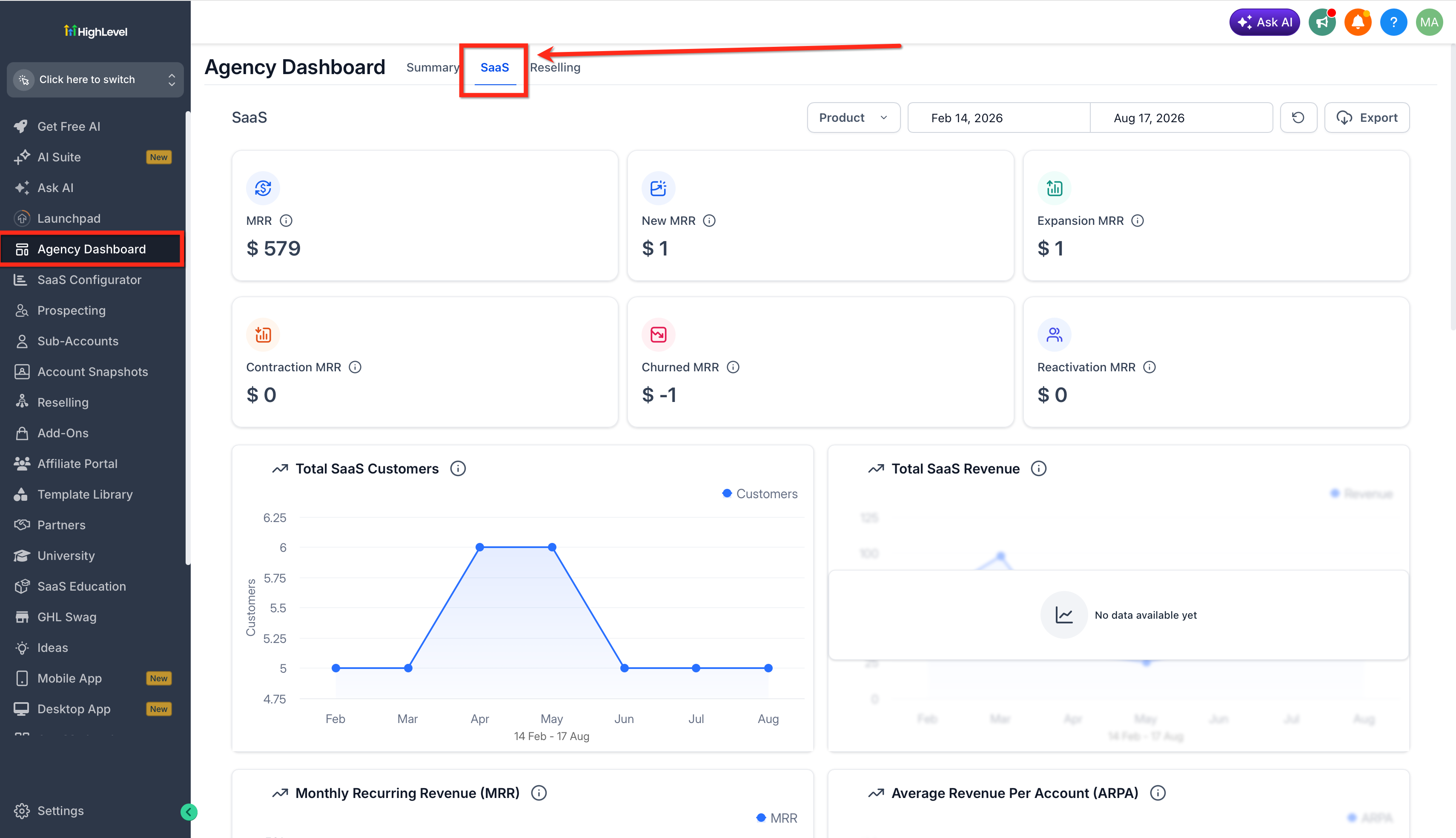
Click on the Product button to filter by existing SaaS products.
Use the Date Range finder to filter by particular time span.
Click on the Reload button to refresh the data.
- Click on Export to send a CSV file to the selected users. It usually takes 7 - 10 minutes.

- Go through the MRR Components
- MRR: total monthly recurring revenue.
- New MRR: first-time paid subscriptions or trial conversions.
- Expansion MRR: upgrades or added recurring value.
- Contraction MRR: downgrades or recurring value reductions.
- Churned MRR: cancellations or full lapses.
- Reactivation MRR: previously cancelled/paused subscriptions returning to paid.

- Total SaaS Customers and Revenue by month.

- Total MRR by Month and Amount & Average Revenue Per Account(ARPA).

- MRR by Plan. (Monthly Recurring Revenue coming from individual SaaS plan).

- Customer Plan Expansion/Contraction (Upgrades/Downgrades) by Month and Number of Customers.

Net MRR Churn Rate – The percentage of monthly recurring revenue lost from existing customers (after accounting for upgrades/expansions) over a given period.
Plan-Wise Customer Distribution – How your total customers are split across different subscription plans.

State Transitions → MRR Type
| From → To | Maps to | Notes |
|---|---|---|
| Trialing → Active (paid) | New MRR | First paid month after trial. |
| None → Active (new paid) | New MRR | First-time purchase without trial. |
| Active → Active (higher plan) | Expansion MRR | Upgrade or increased recurring value. |
| Active → Active (lower plan) | Contraction MRR | Downgrade or reduced recurring value. |
| Active → Cancelled | Churned MRR | Cancellation at period end or immediate per policy. |
| Cancelled/Paused → Active | Reactivation MRR | Subscription returns to paid/active. |
Subscription Status Meanings
Status determines whether revenue is counted and how it appears in components.
| Status | Meaning | Counted in MRR? |
| Active | Current paid subscription in good standing. | Yes |
| Past Due | Payment failed; grace logic may apply. | Yes, until cancellation per policy |
| Trialing | Free/discounted trial before first payment. | No (until paid) |
| Paused | Temporarily suspended at customer/agency action. | No, unless reactivated |
| Cancelled | Ended subscription; no active billing. | No (contributes to churn when it occurs) |
| Unpaid/Incomplete | Payment setup incomplete or unpaid. | No |
What’s Included vs Excluded in HighLevel MRR
Scope clarity prevents confusion when comparing to other tools.
Included
SaaS subscriptions created and managed within HighLevel.
Recurring charges normalized to a monthly value (e.g., annual divided by 12).
Excluded
Subscriptions billed outside HighLevel (e.g., direct Stripe items not managed in HighLevel).
One-time charges, setup fees, and usage-only nonrecurring items.
Methodology & Currency Handling
Consistent methods and currency treatment ensure comparable, auditable results.
Event-based MRR: MRR changes are recorded from subscription lifecycle events (new, upgrade, downgrade, cancel, reactivate). This yields auditable New/Expansion/Contraction/Churned/Reactivation values.
Improved accuracy backend: MRR and churn calculations run on our updated backend for higher accuracy and consistency.
Currency normalization: Values are normalized in USD for consistency. Multi-currency is not included in MRR totals unless otherwise noted.
Why numbers differ from other tools: Inclusion logic, timing, proration, and currency handling vary. HighLevel measures only subscriptions managed within HighLevel and normalizes to monthly values using an event-based approach.
Frequently Asked Questions
Q: Who can access the SaaS Analytics tab?
Agencies on the $497 (Pro) plan).
Q: Do trials count toward MRR?
No. MRR starts when the subscription becomes paid/active.
Q: Are one-time charges or setup fees included?
No. Only recurring subscription amounts normalized to a monthly value are included.
Q: How do upgrades and downgrades show up?
Upgrades appear as Expansion MRR; downgrades appear as Contraction MRR.
Q: What counts as churned MRR?
Monthly value from subscriptions that cancel or fully lapse.
Q: Can cancelled accounts be counted again?
Yes. When they resume a paid subscription, the monthly value is Reactivation MRR.
Q: What currency are values shown in?
USD normalization.
Q: Do paused subscriptions count?
No, while paused. If they return to paid/active, that contributes to Reactivation MRR.
Related Articles
Was this article helpful?
That’s Great!
Thank you for your feedback
Sorry! We couldn't be helpful
Thank you for your feedback
Feedback sent
We appreciate your effort and will try to fix the article