Appointment booking in Voice AI in HighLevel allows your AI phone agent to offer available times, collect required details, and confirm appointments during live calls. Depending on your setup, Voice AI can book on a single calendar or route callers across multiple eligible calendars using intent-based matching. This helps reduce manual scheduling work, improves caller experience, and keeps booking aligned with your configured calendar rules and availability.
TABLE OF CONTENTS
- What is Appointment booking in Voice AI?
- Key Benefits of Appointment booking in Voice AI
- Single Calendar Booking
- Multiple Calendars Booking
- AI‑Powered Calendar Selection
- AI‑Generated Descriptions & Trigger Keywords
- Prerequisites
- How To Setup Appointment booking in Voice AI
- Where the AI’s Answers Are Saved
- Frequently Asked Questions
- Related Articles
What is Appointment booking in Voice AI?
Appointment booking in Voice AI allows HighLevel Voice AI to handle scheduling conversations in real time by offering open time slots, collecting missing details such as email when needed, and confirming the booking without sending the caller to an external booking page. In the current setup experience, this can support both a single booking calendar and multiple eligible calendars, depending on how the agent is configured.
Key Benefits of Appointment booking in Voice AI
- Frictionless scheduling: callers can book directly during the call instead of being redirected to an external link or waiting for manual follow-up.
- Single and multiple calendar support: Voice AI can book against one selected calendar or choose between multiple eligible calendars based on caller intent.
- Smarter availability handling: the AI respects calendar rules such as availability, buffers, minimum notice, and conflict settings from the selected calendar.
- Better booking accuracy: when multiple calendars are configured, the AI uses the full conversation context to match the caller with the right appointment type.
- Automated data collection: the AI can prompt for missing information, such as an email address, so bookings are more complete and easier to follow up on.
- Improved caller experience: natural voice conversations make it easier for leads and customers to book quickly, even when services need different calendars or routing logic.
Single Calendar Booking
Single calendar booking is ideal when one Voice AI agent should always book into the same appointment type. This setup keeps scheduling simple and works well for businesses that route all callers to one service, one rep, or one standard appointment flow. With single calendar booking, you choose one calendar for the Book Appointment action and then control how many days and time slots the AI offers. It is the easiest way to launch booking directly from a call.
Multiple Calendars Booking
Multiple calendars booking helps Voice AI route callers to the right appointment type when your business offers more than one service, team, or booking path. This is useful for demos, pricing consultations, discovery calls, or new-patient intake, where each service should book on a separate calendar. When multiple calendars are eligible, Voice AI analyzes the conversation and chooses the best-fit calendar based on intent, context, and your calendar configuration. It can also use confidence and priority logic when more than one calendar may match the caller’s request.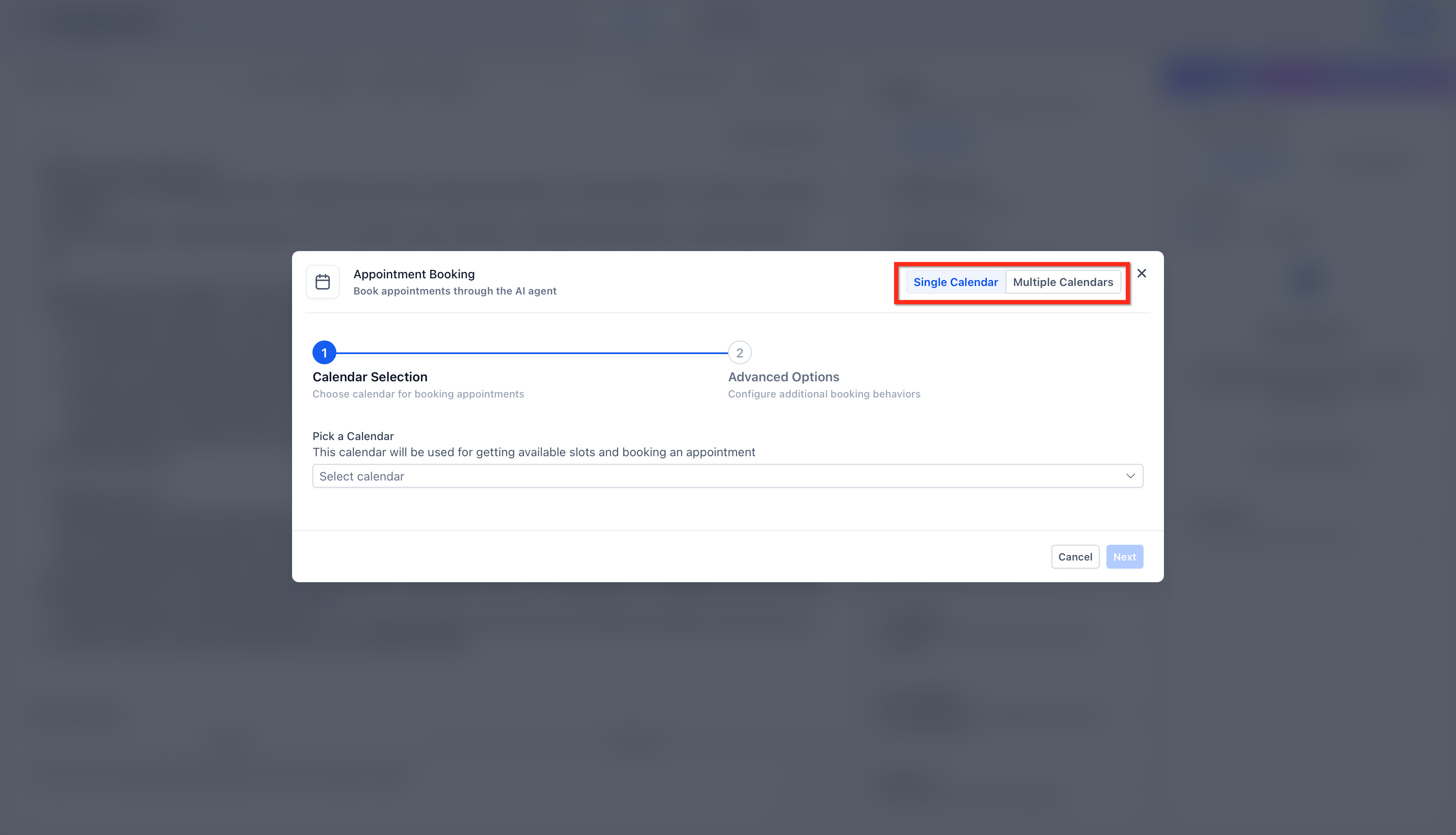
AI‑Powered Calendar Selection
The AI analyzes conversational intent and context to decide which calendar best matches the caller’s request. It can distinguish similar phrases and use the caller’s wording, questions, and clarifications to boost accuracy.
Example Mappings:
- “I’d like to schedule a demo” → Demo Calendar
- “I need to talk about pricing” → Sales Consultation Calendar
- “I’m a new patient; first visit” → New Patient Intake Calendar
Considerations:
- Uses the full conversation, not just isolated keywords
- Honors availability, buffers, min notice, and conflicts from the selected calendar
- Supports confidence/priority logic when multiple calendars may match
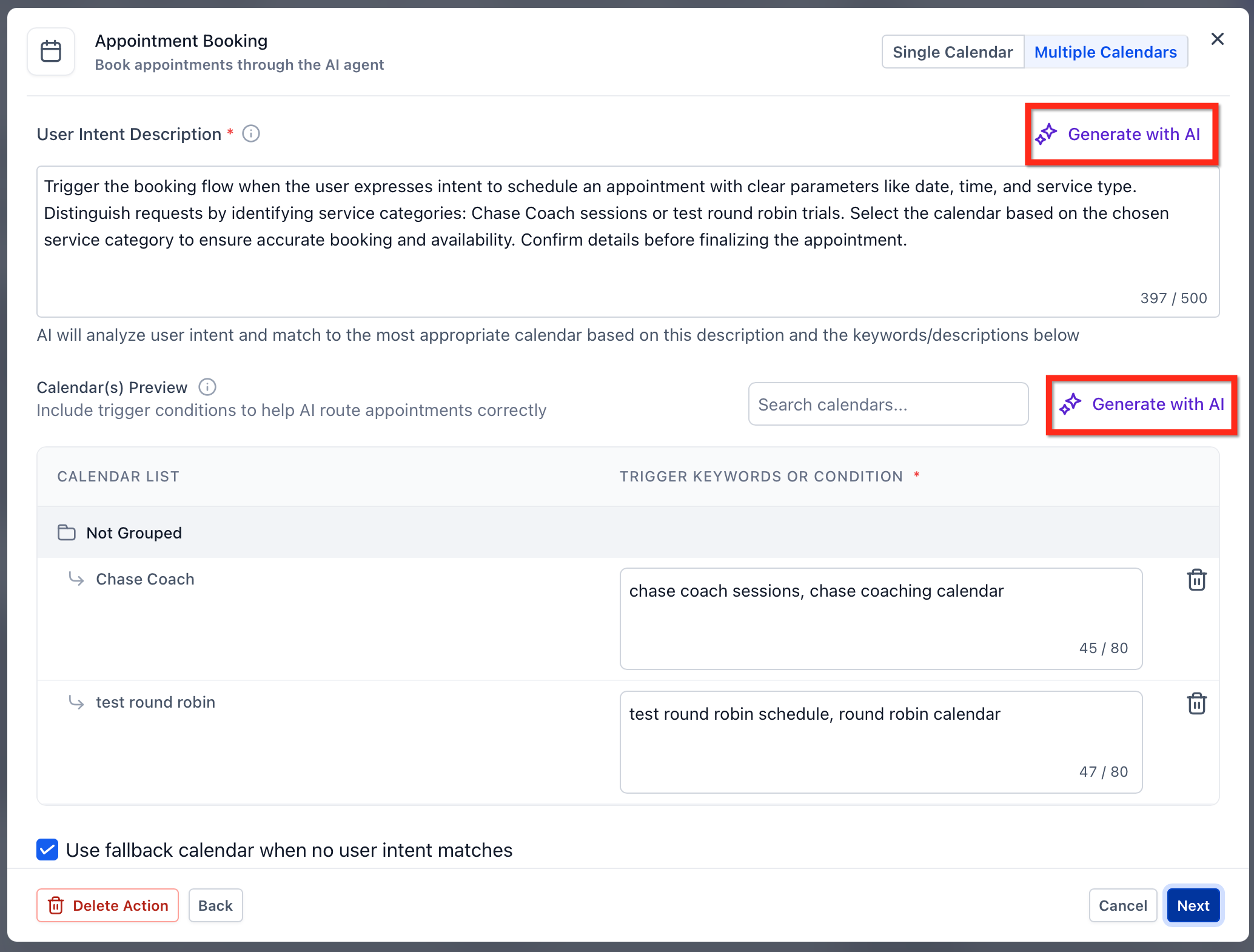
AI‑Generated Descriptions & Trigger Keywords
AI can generate clear calendar descriptions and suggested trigger phrases so the system better understands when to use each calendar. You can accept, refine, or replace these to suit your brand and services.
- Provide calendar names and essential details; AI drafts descriptions
- Review/edit suggested trigger keywords per calendar
- Use concise, specific language; avoid overlapping phrasing across calendars
Prerequisites
A strong setup starts with the right prerequisites already in place. Preparing your agent, calendars, and permissions first helps prevent booking errors and avoids confusion when Voice AI begins offering live appointment times.
Before enabling appointment booking in Voice AI, make sure you have:
- A HighLevel Voice AI agent created, or access to create one.
- At least one HighLevel booking calendar configured for the service you want to book.
- Correct calendar rules set up, including availability, duration, buffers, and booking rules.
- Any connected external calendar needs already configured where applicable, such as Google Calendar or Outlook support.
Note: AI working hours and calendar availability are related but separate. AI working hours control when the agent is available to handle calls, while calendar settings control which appointment times can actually be booked.
How To Setup Appointment booking in Voice AI
Proper setup ensures Voice AI can understand booking intent, use the right calendar configuration, and guide callers through scheduling without unnecessary friction. Following one unified setup flow also makes the experience easier to configure whether you want to book on a single calendar or across multiple calendars.
- Go to your HighLevel sub-account and open AI Agents > Voice AI. Create a new Voice AI agent or open an existing agent you want to use for appointment booking.
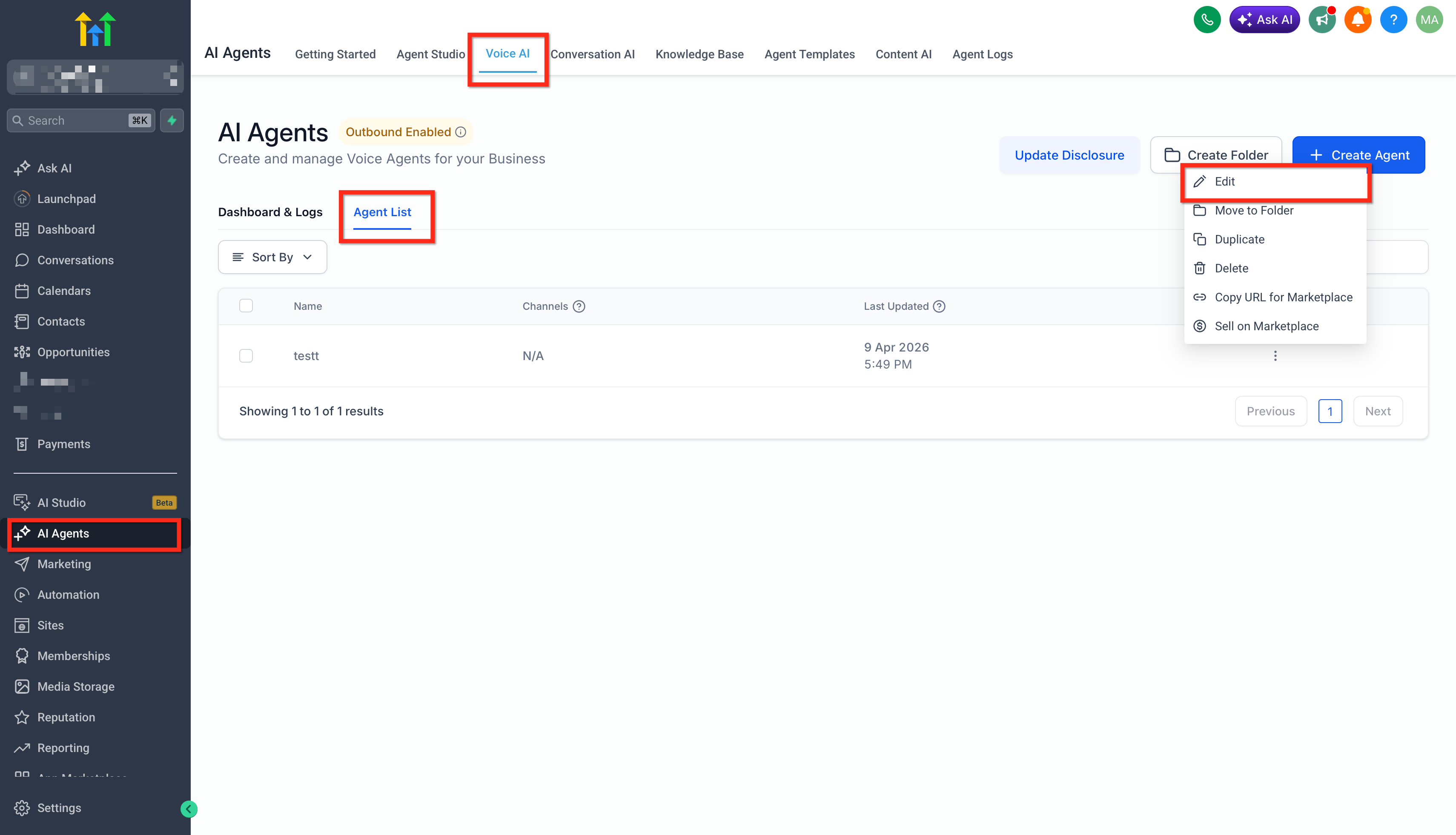
- Complete or review the basic agent setup, including the required agent details and any phone or availability settings you want the agent to use.
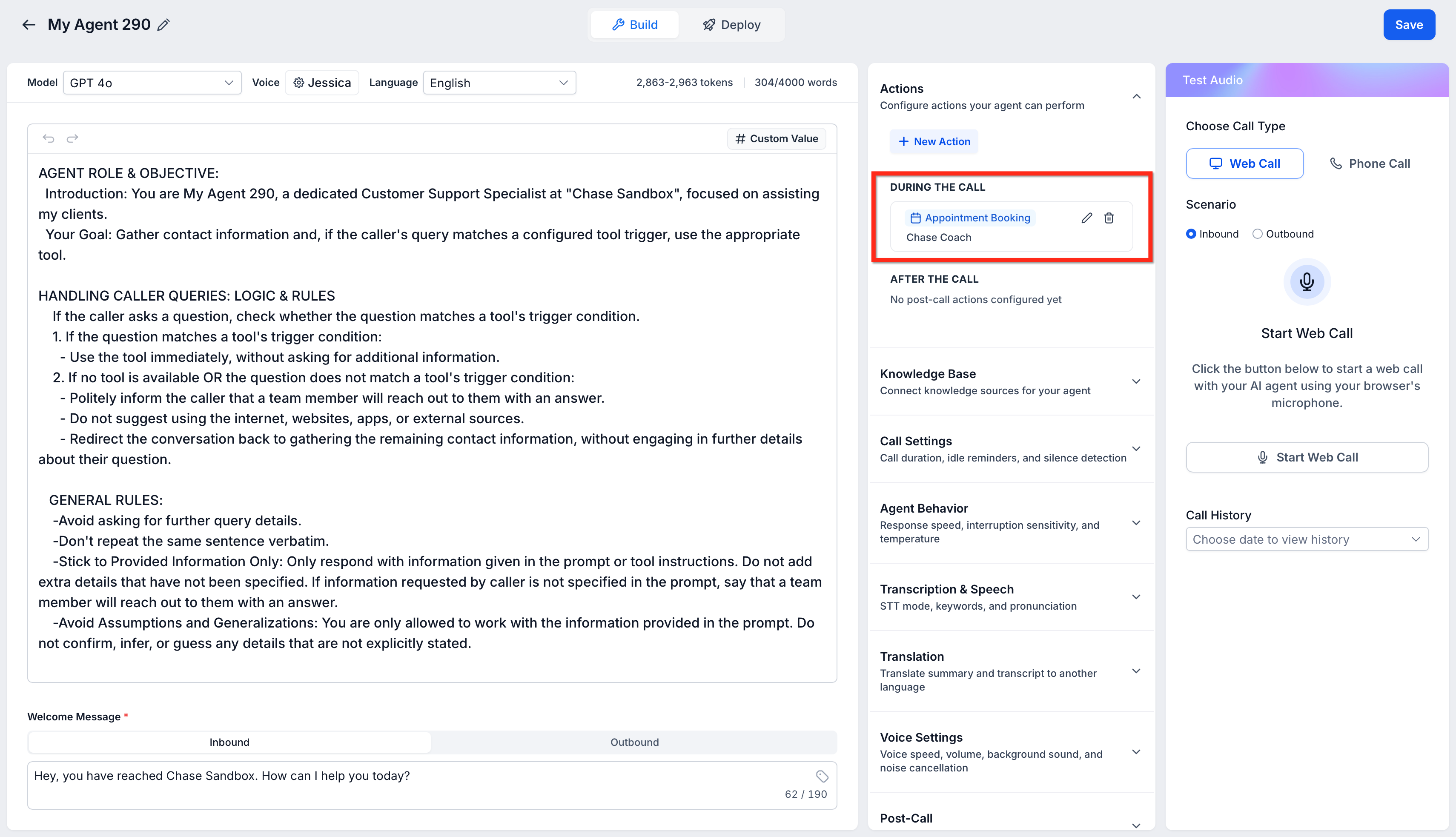
- In the Actions section on the mid-right panel, click + New Action and select Appointment Booking.
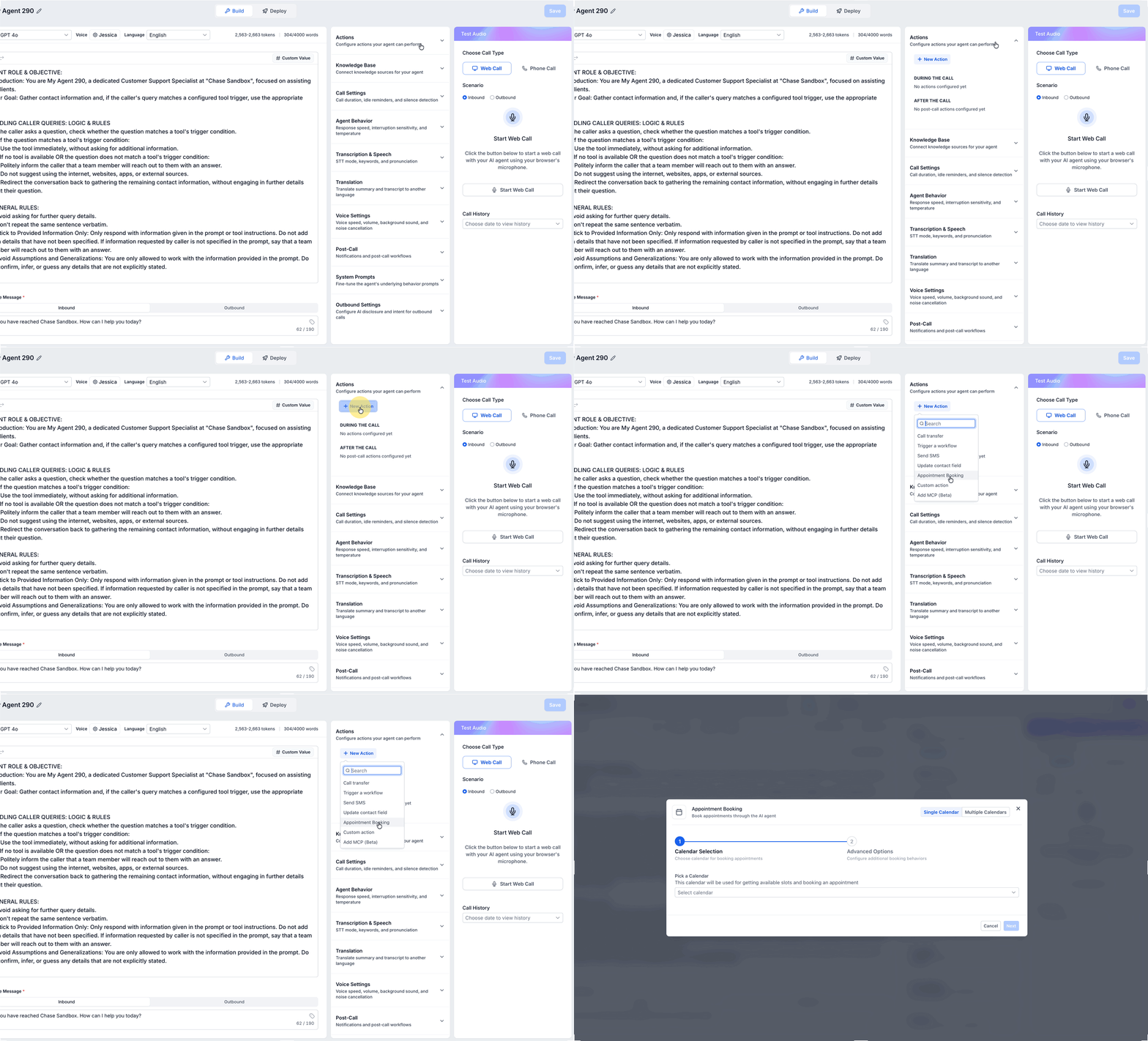
- Choose how Voice AI should handle calendar selection:
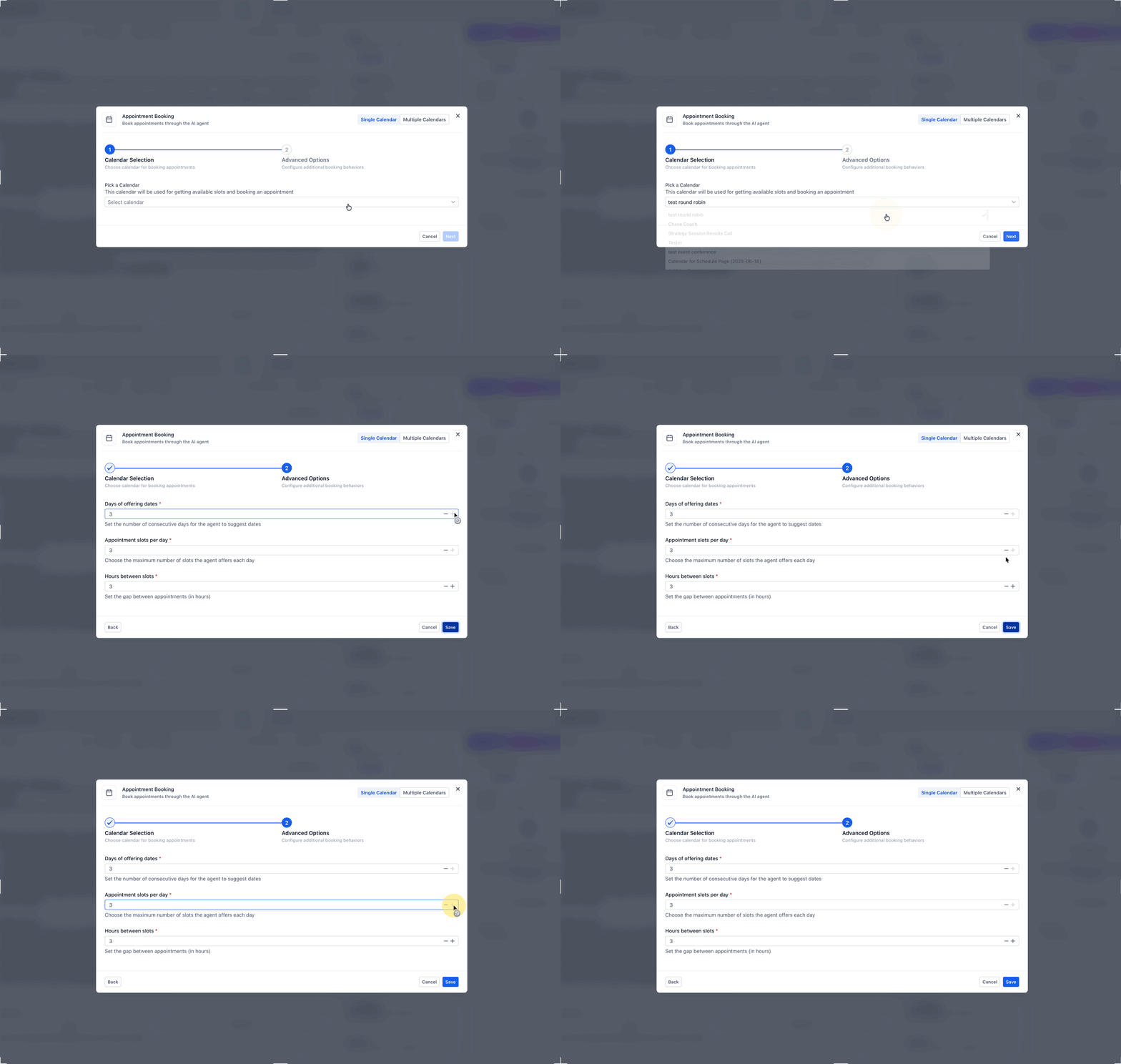
i. Select Single Calendar if all appointment requests should go to one booking calendar. Also configure:
Offering Days to control how many future days the AI should offer
Appointment slots per day to control how many time options are presented each dayHours between slots to control spacing between offered times
ii. Select Multiple Calendars if Voice AI should route callers to different calendars based on service type, department, or caller intent. Add the eligible calendars Voice AI should use, then configure each one with clear descriptions and routing cues so the AI can choose the best-fit calendar based on the caller’s request. If needed, add fallback behavior for requests that do not match cleanly.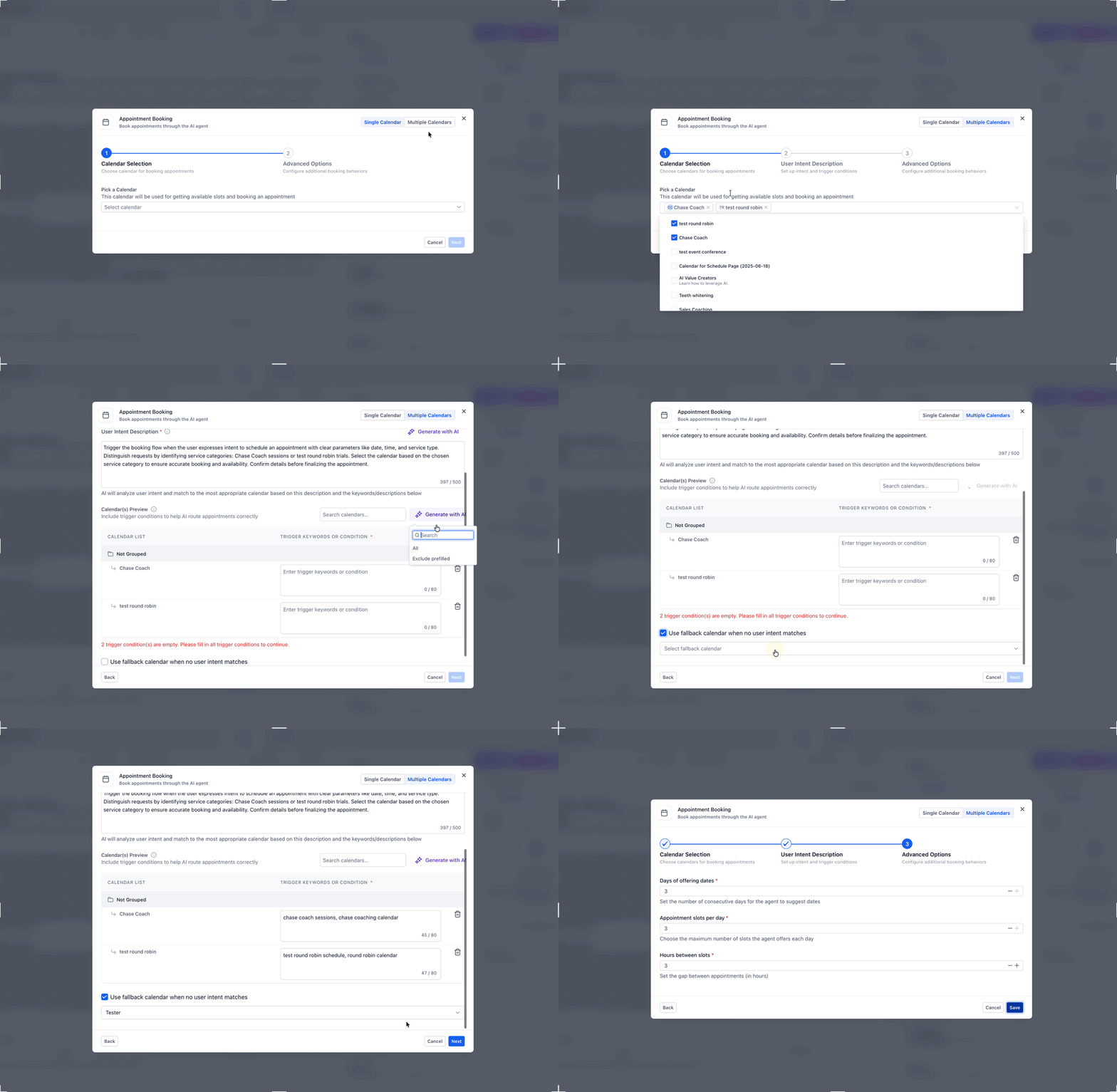
- Save the agent and test the experience to confirm the correct calendar is selected, the time slots are appropriate, and the booking flow works as expected for your use case.
Notifications after a booking call
Booking confirmation notifications: Appointment-related confirmations are handled by the notification settings associated with the calendar used for the booking.
Voice AI post-call email notifications: These are separate emails sent after the Voice AI call ends and can include the call summary, contact information, and call transcript.
Configuring a Voice AI post-call email does not replace or control the calendar’s booking confirmation notifications. To configure emails sent after a Voice AI call, see Creating Voice AI Agents and review the Email Notifications/Post-Call settings.
Where the AI’s Answers Are Saved
Knowing where booking-related data ends up makes it easier to report on calls, prepare your team, and build follow-up automations. Different pieces of information can live in different areas depending on how the booking flow is configured.
| Answer or Data Type | Where It Is Saved | Details |
|---|---|---|
| Call recordings, transcripts, and summaries | Voice AI call logs or dashboard views | Helps teams review the full conversation and understand appointment context. |
| Answers mapped during qualification | Contact custom fields | Useful for reporting, segmentation, and routing decisions. |
| Key appointment context | Appointment notes through workflow-based follow-up | Helps reps prepare before the meeting. |
| Custom booking form responses | Appointment record form area | Available when a custom booking form is used as part of the appointment setup. |
Frequently Asked Questions
Q: Does Voice AI appointment booking support both single and multiple calendars?
A: Yes. Voice AI supports standard single-calendar booking and can also route across multiple eligible calendars using intent-based selection.
Q: How does Voice AI choose the right calendar when multiple calendars are enabled?
A: Voice AI uses the caller’s intent and the broader conversation context to match the request to the most appropriate eligible calendar. It can also use confidence and priority logic when multiple calendars may fit.
Q: What happens if the caller does not provide an email address?
A: The AI can prompt for a missing email before confirming the appointment, helping create a more complete booking record.
Q: What happens if none of my calendars match the caller’s request?
A: You can configure fallback behavior so the AI can present available services, use a fallback calendar, or take another guided action.
Q: Can I ask qualification questions before the AI books the appointment?
A: Yes. You can configure the booking flow to collect useful information first, then route the caller to the appropriate appointment path based on those answers.
Q: Can I use Services with appointment booking in Voice AI?
A: Not at this time. Voice AI currently supports Single Calendar and Multiple Calendars for appointment booking, but Services is not currently available in the Voice AI booking setup.
Related Articles
Was this article helpful?
That’s Great!
Thank you for your feedback
Sorry! We couldn't be helpful
Thank you for your feedback
Feedback sent
We appreciate your effort and will try to fix the article