Sent your affiliate link to a new HighLevel customer but don't know where to check if they are under you? Here we will show you all the steps you can take to find your affiliate customer!
Covered in this article
- Log into HighLevel to view your Affiliate Dashboard!
- Super Charged SaaS Campaign
- Finding Commission in the Rewards tab!
- FAQ
Everything will be updated very soon to reflect the latest version. In the meantime, if anything feels unclear, reach out to your Affiliate Manager with any questions.
Log into HighLevel to view your Affiliate Dashboard!
The Affiliate Dashboard organizes your referrals into different stages so you can track their progress.
Click here for assistance finding and navigating your Affiliate Dashboard
Note if you do not have a Active HighLevel Agency you can follow along by logging into first promoter here: gohighlevel.firstpromoter.com/login
1. Click on Affiliate Portal

2. From your Affiliate Dashboard, Click on Referrals
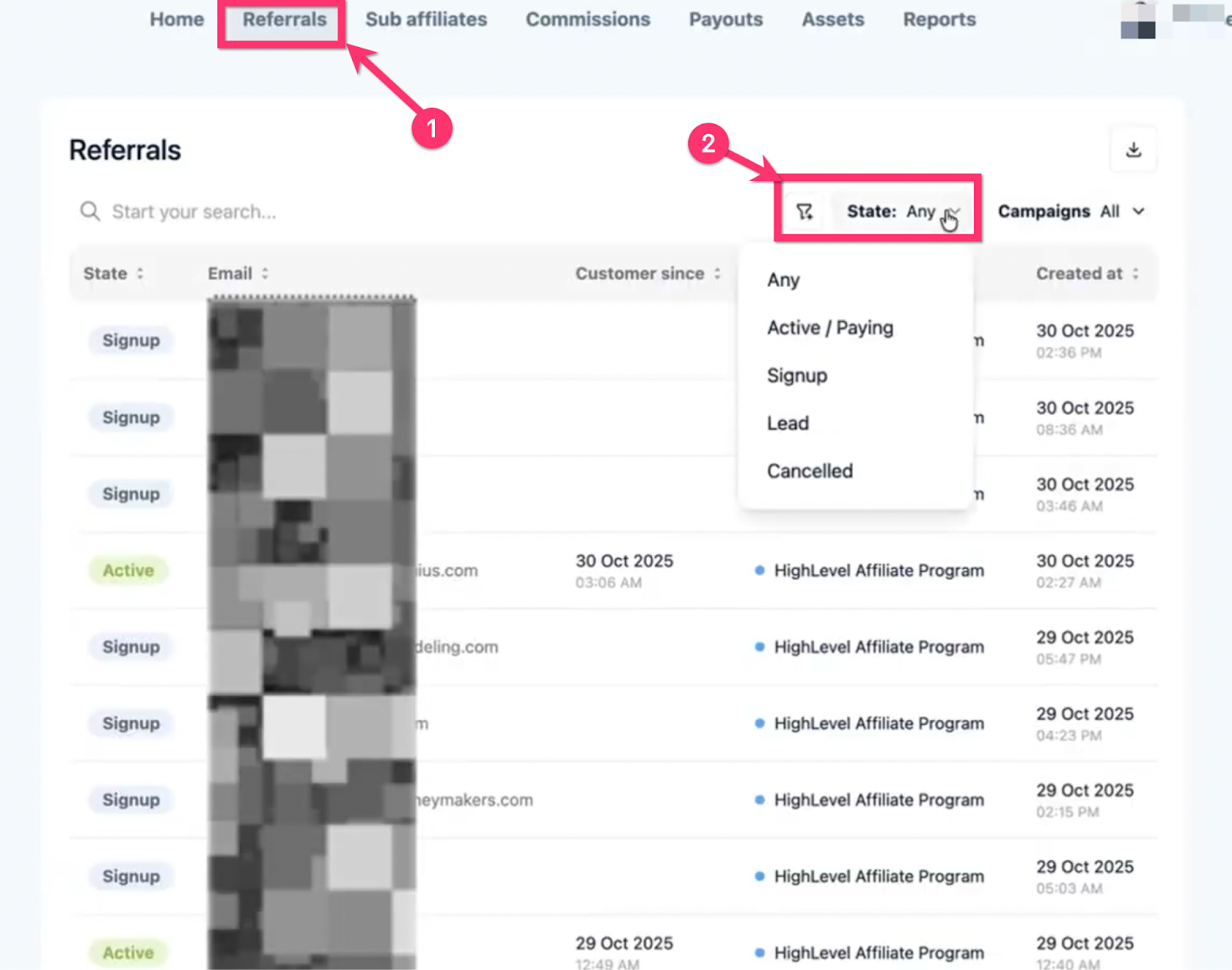
Your Referral Categories
1) Any
2) Active / Paying
3) Signup
4) Lead (or, “Subscribed”)
5) Canceled
1) Any
This shows all your affiliate customers from every referral category.
2) Active / Paying
These are your current active affiliate customers who are paying a HighLevel subscription. You are earning a commission on these customers every time they renew their subscription!
Note: You will only earn a commission on customers who pay thier subscriptions. If customers pause, cancel, or request a refund you will not get a commission for those customers.
3) Signup
These customers have completed the sign-up, and they have active go HighLevel accounts on a free trial
These customers will have a status that says Not A customer yet. This means they are in trial and will become a customer when they pay their first subscription.
4) Lead (or, “Subscribed”)
These are customers that have only completed step one of the free trial sign-up.
These are potential customers who have started the signup process using your referral link, but did not complete it to begin their free trial.
* For referrals in this state, you might notice a discrepancy between State Filter (Lead) and State (“Subscribed”). “Subscribed” and “Lead” are interchangeable in this context.
5) Canceled
These customers have canceled HighLevel subscriptions. You are currently not getting a commission on these customers. When these customers renew their subscription they will switch back to the paying category.
Super Charged SaaS Campaign
Got an email stating that you have a reward/commission from the Super Charged SaaS Campaign? To see that reward/customer you need to "View another Campaign"
(This is also a good place to check if a customer "disappeared" from your HighLevel Affiliate Program view after upgrading)
1. Click "View Campaign" under Supercharged SaaS Program
(These are your customers that upgraded to the 497/month also known as the SaaS plan or Pro plan. They will be moved over to this campaign.)
2. Click on Referrals
Click referrals and check if your customer can be found under the tabs shown here!
3. Referral tabs in the Supercharged SaaS Program
The Supercharged SaaS program campaign shows the same tabs under referrals as the HighLevel Affiliate Program Campaign

Finding Commission in the Reports tab!
Click on "Rewards" to view your earned commissions.
Commissions earned from the HighLevel $497 Proplan will be placed in the Super Charged SaaS Program Campaign. Click "View another campaign" to see those Commissions

FAQ
Q: I referred an existing customer to HighLevel pro. Why aren't they showing in my referrals?
A: When you refer an existing customer to HighLevel Pro they become a split customer. They will not show in your referrals because you are not the original affiliate that brought them to HighLevel. However, when they pay their subscription for Highlevel pro you will see the commission from that customer in your rewards tab along with that customer's email.
If you want to confirm that you are a split affiliate for a customer you referred to pro. Reach out to support, with the link above!
Want to learn more about the Referrals tab?
Click here for a more detailed explanation about each tab!
Still can't find your referral? Click here to contact support and get more help!
Was this article helpful?
That’s Great!
Thank you for your feedback
Sorry! We couldn't be helpful
Thank you for your feedback
Feedback sent
We appreciate your effort and will try to fix the article